Pages

Pages

Tutorial Root HTC One S with Hasoon Toolkit

Thanks to hasoon toolkit, we can give you the news that the HTC One S smartphones, were already rooted. To root HTC One S devices now you can do it be only few simple steps, So you don't need to playing with ADB, or another terminal that can make you confuse if you are new in android customization

The rooting process had improved a lot in recent times, and turn away more and more days in which to have root permissions you had to manually modify the individual command lines. In particular, users who use HTC One's you will find a toolkit capable of doing much more than just a rooting your phone. This tool can make a recovery, edit controls, gain permanent root permissions and much more.
In this guide we will explain how to install and use the all-in-one hasoon2000

root process on htc one s

But before start the guide i will give some review about its phone software
HTC One S is equipped with Sense 4.0 is definitely the best graphic customization that you can find on an Android smartphone, thanks to the large amount of useful software that are inside, such as applying for the weather, one for financial measures or notebook with handwriting. Excellent reactivity of Polaris Office for the management of office documents. It also has a good panel for managing the phone while using in your car.

Requirements
  • A phone HTC One S
  • A PC with Windows operating system
  • WinRar, 7-Zip, or a similar utility to unzip files
  • You have saved a backup of important data or have them transferred to the SD card
  • A high battery level, ideally over the 60-70%


Installing hasoon 2000 toolkit for HTC One S


How To Root HTC One S

Unlock the bootloader

The bootloader of the phone can be unlocked using the toolkit in a few simple steps.

  1. To install HTC drivers click on Install Htc Drivers , and then click Go. the drivers will be installed automatically on your PC.
  2. Click on Register at HTCDev , and then click Go to register for an account on Htc's website Development. Create an account and login.
  3. Click Get ID Token to select Go. A prompt will appear that will show you the ID of your phone. Now make sure that your phone is connected to your computer.
  4. Using the Submit ID Tokens and Go by entering your ID to the HTC site Development. Make sure you are logged in to the site before clicking on this box.
  5. If all procedures were completed without errors, you can now unlock the bootloader using Unlock Bootloader and click Go.

Here is the preview of hasoon toolkit for htc one s
hasoon root for htc one s

Start permanent root permissions

To obtain Root permissions on HTC device One S do the following:

  1. Connect your HTC One S to your computer using a USB cable
  2. Launch the toolkit all-in-one HTC
  3. From Commands, choose Boot into Recovery and click Do Command. Wait for your device to reboot in recovery mode
  4. Under Extras, choose Perm Root (GB/ICS) and click Run


You now already have root permissions on the phone! If you are don't like to complex procedures but you want to explore yourself the potential of your HTC One S, this toolkit will save you a lot of time and frustration, allowing you to run the main processes related to rooting and recovery directly from a single screen.

Easy Tutorial Recover Deleted Files On Internal Memory

You have accidentally deleted all your data in internal memory because of a wipe when you want to install a new custom rom? or maybe because there were not told befire that unlocking the bootloader is the same as done a format? and you don't know how to restore the file that have been formatted?

Don't worry, you can still recover deleted files from internal memory by following the step below that i will expalin
recover deleted data on internal memory

THEORETICAL PART
(if your goal is just to recover data, you can skip the explanation)
The internal memory is not mounted as any other external memories. The latter, in fact, allow the user to use the software to scan and recover deleted files. The procedure is quite similar with all files in most operating systems. There are two types of formatting: the full and rapid.

The full version is to clear all the bits (i.e., turn all the bits from 1 to 0). In our case, if we find ourselves with a terminal with 16 GB of memory, do the full format would be equal to having to transfer a file from 16 GB, because it would require the same time to transform the bits from 0 to 1.
The quick format instead, going to delete the file table, which is typically a table that exists in almost all file system. This table (usually located at the beginning of memory) occupies a small part of the memory and consists of a series of pointers that point to addresses where the files reside. These pointers will also describe the file name, size, owner, date, permissions, etc. Logical therefore, that becomes erasing this fraction of memory that specifies where files are allocated, it will be impossible to find them and are unreadable, although present in that No bit has been deleted. Being the wipe, the formatting and the factory reset very fast, it goes without saying that formatting is used. However, things by reading all the bits you can reconstruct files, although it will result in loss of file names and characteristics. To date, much of the mounted file systems are recoverable, except for devices with internal memory as MTP/PTP, which are those that affect us. Then i will explain how to transform (or transfer) that the file system so that it can be read and recovered.

How to recover deleted files on internal memory

PRACTICAL PART

Requirements

  • Make sure that your device has the permissions of root;
  • Make sure you have BusyBox installed on your device. If you don't have it installed (or if it is not present in your custom rom), you can download it below:
  • download BusyBox
  • USB Debugging enabled in your device;
  • ADB installed;
  • Recuva installed, or any other recovery Tool(to install it, go to that link and click right on get latest version


  1. Now after you have prepared all the requirements, lets start the recovery process
  2. Download Cygwin from this link and proceed with installation as follows: next-> select Install from Internet and then forward-> make sure that the Root directory is C:\cygwin and select next-> next-> next-> select a mirror (I selected ftp://lug.mtu.edu that it seemed the fastest, but others are fine), click on next-> there you will see a list of categories look for nc and select NET, click skip and place the mark on bin?the line about nc, as in the image. Do the same thing for pv, as in the image below. Click ' next ', it will take several minutes to download all-> click Finish.
    restore deleted files on internal memoryhow to use cygwin
  3. We take adb.exe and AdbWinApi.dll AdbWinUsbApi.dll, and copiamoli in C:\cygwin\bin;
  4. Download VHD Tool from this siteby clicking on VhdTool.exe
  5. VhdTool.exe and for goodness sake, we always in C:\cygwin\bin path ;
  6. Create in a new folder called C:\Cygwin nexus;
  7. Connect your phone and make sure that is working in ADB;
  8. Open Cygwin (Terminal) and assume that BusyBox is installed in /system/xbin/busybox . In some cases you may have to /system/bin/busybox. Type:
    adb forward tcp:5555 tcp:5555adb shell su (il vostro dispositivo potrebbe richiedervi i permessi di root ora)/system/xbin/busybox nc -l -p 5555 -e /system/xbin/busybox dd if=/dev/block/mmcblk0p12
  9. Then open a new Cygwin Terminal and write:
    adb forward tcp:5555 tcp:5555cd /nexus nc 127.0.0.1 5555 | pv -i 0.5 > mmcblk0p12.raw
  10. Expect a thing like ... several hours (to extract 8 GB of data I took ben 4 hours time!) until you'll find in your nexus one raw filetutorial recover internal memory
  11. After unpacking, we can close the first and continue on the shell that works in /nexus write:
    VhdTool.exe /convert mmcblk0p12.raw
  12. Now go to start, right click on Computer and select Manage-> Storage -> disk management (local) and Action menu select Attach VHD File, click on browse, and we feed our raw file located at C:\cygwin\nexus (be sure to display all files, as in the picture)

  13. Click with the right mouse button on the name (as "disk 1") to the left than the non-alloccato and select initialize disk; then select GPT (GUID Partition Table) and then OK. (if you find it close and go back in the disk management, you will automatically ask if you want to put GTP or not). If there are Windows that ask you to format, rejected.
  14. Right click on the memory alloccata and select "New simple volume", we proceed forward, making sure not to format the volume.
  15. The fact that we should have a new drive under my Computer (not open it because there's chiederebe format); back in the computer Management, right click in the rectangle and select RAW Formats, ensuring that the file system is FAT32, you bet the Quick format check box and the allocation unit size is "default", as in the image below.accidentally deleted internal memory
  16. Recuva wizard, start we want to retrieve Other (bottom)-> check at a specific location and select the letter of the book assembled previously-> put the mark on Activate in-depth scan.
  17. Wait. retrieving the files are not things that happen very fas. then to the next
  18. After the scan, we'll have a series of files that we want to recover, select the button "recover ..." and we configure a destination where recovered files will be saved. If the error will appear "path exceeded maximum length", make sure that the file names are not too long, or try to rename them.

Done. Have you had any particular problems on the instruction of restore deleted files on internal memory ? For other questions please refer to the official thread at xda, or ask the question on the comment area below since the guide was tested by us personally and found working. I hope this However, some files are fetched only in part, but is always better than not having them at all.

How To Improve LG Nexus 4 Camera Quality

Although not officially in Italy, the Google LG Nexus 4 does talk a lot about itself even as far as for the modding development. It certainly won't have the same camera of his brother LG Optimus G, but having a Nexus 4 is very likely that we could do something to improve the quality of video recording. So at this post i will share some a good tips for improve Google Nexus 4 Camera.
It has recently been found a xml file that would increase the video framerate, which will make the records more fluid but heavier at the same time for what will be its size in memory. However, to modify this file you must have root permissions. So before we start the modding process if you haven't root your nexus you can read my post about how to root nexus 4

how to improve lg nexus 4 camera

In addition to this frame rate settings, you can also change other settings such as frame size, quality, number of audio channels, etc.

How To Improve Photo Quality On Nexus 4

Here's how you can perform this modding to improve your nexus 4 camera quality:

  1. Download an app to browse files (like root explorer or es file explorer, that file is free) you can download it from google play.
  2. Head in the /system/etc folder;
  3. Make sure the directory is mounted as writable (RW);
  4. Look for the media_profiles.xml file and open it with a text-file editor (es file explorer has one built-in);
  5. Once opened, you should find yourself with this text:
    quality EncoderProfile < = "1080p" fileFormat = "mp4" duration = "30" >
    < Video codec = "h264" bitRate = 12000000 " width = "1920" height = "1080" frameRate = "30"/>< Audio codec = "aac" bitRate = "96000" sampleRate = "48000" channels = "1"/>
  6. Change the bitRate from 12000000 to 20000000 (2 followed by 7 zeroes);
  7. Save and reboot.
  8. With this, you should have a 20 Mbit encoding which is definitely better than one of 12Mbit.


If you do not want to take part in this operation, there is however an application should perform a similar work, which you can download it directly from google play.
Download lg camera app if you want you can save it to apk file : how to download apk from google play

Ok thats for the modding tutorial for improve the camera and video quality on lg nexus 4. I hope this can be useful for your daily need.

How to Do Factory Reset On LG Optimus Dual

If anything go wrong when you customize your lg optmius dual you will need this tutorial on how to perform factory reset, so it will make your phone become original state when you first bought it. Now you know, Android smartphone after a short time, begin to get a variety of changes or updates to your system. Thanks to continuous development by the community. Because we don't have to wait months for an official update or bugfix. However sometimes something can go wrong, and it may will risk our smartphone become soft brick or hard bick.
So Today I will explain how to restore factory reset conditions (become exactly same as when we have bought the phone), at this time the new LG Optimus Dual. This procudera is also suitable if you need to bring the service mobile.

how to restore lg optimus dual to original firmware
Read also : Update LG optimus 2x to jelly bean

Read First
ATTENTION Tutorial For android does not assume any responsibility in case of user error or unexpected results; the following procedure has been tried and tested many times, but If done incorrectly, can compromise irreparably your device.

Requirements


How To Restore LG Optimus Dual To Original State

After downloading all the necessary file lets proceed to the restore lg optimus dual procedure.

  1. Install LG drivers (only if you have not already installed).
  2. Extract the program smartFlash in a folder and then run it with administrator permissions (in the case of Windows Vista/7) by double clicking on the file SmartFlashTool_P990.exe
  3. Turn off dual pull the battery and connect it to the pc by pressing and holding the volume down button; smartflash should recognize and locate the Terminal.
  4. Go to the tab "copy D\L Rom" and ensure that Normal Mode is selected, and that Cal does not Erase is selected.
  5. Click on the first field "CP bin" and go to load the LGP990AT-00-V10a-NEU-XXX-MAR-02-2011 +0 _CP.fls file,which is located inside the firmware package you have retrieved previously.
  6. Click on the second button "AP bin" field and select the file LGP990AT-00-V10a-NEU-XXX-MAR-02 2011 +0-_AP.bin, which is also inside the firmware package you first retrieved.
  7. After that click on Start and wait until the procedure is complete, you will see the green bar with the word Download complete; If you receive errors or you don't see appear after several minutes any written, press the "Start" button and repeat the procedure from point 2.
  8. Finished flash Dual will restart and will appear on the screen on LG logo; at this point, disconnect the phone, then reinsert the battery and enjoy your LG again as fresh out of the factory.
Finish. Ok after this procedure finish your lg optimus 2x is already restore to factory default condition. Please comment if you want to ask a question

MWC 2013: latest rumor about new devices that will be presented

Thanks to Google + profile of Flavio Pic, a person who should be very close to the sources believed to be reliable, we can take conlusion and make a list of the new android device that we will see at the upcoming Mobile World Congress 2013, which will begin on February 25. Below is a list of companies that will be involved with their new devices that will be released on 2013.

List Of New Device That will Be Represented On MWC 2013

new device on mwc 2013

Samsung
As we all know, the Galaxy S4 won't be presented at MWC 2013. But Samsung 2013 new tablet, as the Galaxy Note 8 have been previewed yesterday. Will most likely be also presented some device or tablet, the range Tab 3 .

HTC
The "falling" HTC should exhibit well 6 smartphone event, 4 of which were already known. It is Desire, Desire X (which should arrive on the European market), One SV and htc One X +, in addition to M7 and another smartphone to be confirmed. As for HTC M7, is not yet known whether this will be his final name but will most likely be announced shortly before the start of the event.
Huawei
Huawei, in addition to its monstrous Ascend P2, should not present any major device, and should gamble almost on par with Alcatel presenting thin smartphone as well as the new Ascend P2.

Asus
Asus should be present at the event with 2 new Android devices: a smartphone and a tablet. On your smartphone, we know that it will have a 5-inch Full-HD and amenities from top of the range, while the tablet should have a display diagonal equal to 7 inches and features complete phone.


Alcatel
Alcatel should present two new Android smartphones, one of which is ultra-thin at Ascend's P2. To achieve these levels of subtlety, though, unlike company Huawei could not implement the 3.5 mm audio jack for headphones, so you will need a special adapter. It will be most likely a high-end smartphones. Other things that should be presented would have a design almost identical to that of the iPhone 4/4S, Dual-SIM, midrange features and affordable price.

Sony
The Japanese Sony should stand at the Mobile World Congress 2013 with two new midrange Android smartphone that will accompany the new Xperia z. No further information about theXperia Z Tablet that should be present at the event.

These, then, the latest rumor about new devices that should be presented to the most awaited mobile event of the year. We, of course, we will be present at the Mobile World Congress 2013 and we will provide you with information, photos, videos, and fun facts about all the new creations from the mobile World Congress.

Chrome For Android Finally Get Password Synchronization Update

One of the shortcomings of Google Chrome for Android is that of password synchronization with the Desktop version of the browser. This feature, however, it appears that will be missing again for a short time as Google would in his plans the introduction of password synchronization in the upcoming release of Google Chrome Beta for Android.

It must be said that, nor on Android nor on iOS, Google Chrome has this feature, of course, Android users would be the first to receive. In this way, if we input a password on our Desktop Chrome browser and require it, it would trigger at that moment that would sync password information even on Chrome for mobile.

google chrome for android password sync


This new google chrome for android feature should be available for Android through Chrome Beta starting from the month of February and should come on stable version within browser not long, of course subject to contingencies. Most likely Chrome for Android will become more and more a surrogate of the desktop version and over time the two browsers will become totally identical, hopefully even in terms of performance.

We hope that Google operates a new development as code optimization in Android stock rom browser.  And we all know that many android users still currently preferred over Chrome broswser as the best browser in terms of fluidity.

SF Launcher: Inspired From Google Now Reinvents For Android Phone

A new launcher for Android arrives on Play Store which is still in Alpha version. We're talking about SF Launcher, whose interface is derived entirely from Google Now with homescreen that present themselves to tabs. At the present time, being an application still in Alpha version, not many customizations that the new launcher allows, but the developer ensures that in future updates will implement new features.

For now SF Launcher Feature allows you to customize homescreen 2 only organized as follows: the Central home comes with a space provided for a single widget and another space for inserting quick start applications; the home of the right, however, comes with the app drawer that I personally feel very good, with all the icons that are vertical scrolling through sogliate.

SF Launcher: Google Now re-invents the home of Android


sf launcher google now release

The left home, instead, is not part of customizing the launcher but contains the settings the same. Surely this is a very good launcher based on the concept that it is based on the interface of Google Now, and because of this, it is unlike any other Android Launcher.
sf android launcher feature

SF Launcher now already provides a good alternative to the default launcher on their Android devices and, if you want to install the full version which adds even more features than the free, you can buy it at a price of €1,48.

Recall that SF Launcher is compatible with all Android devices with OS version since version 4.0. After a few minutes of use notice that to improve in the near future there are scroll animations between the pages of home, still a bit slow though fluid.
According to you this launcher will evolve as things unfold Google Now? We'll see! If you decide to try it, be sure to express your opinions about it.

Read Also : download android launcher collection

Download SF launcher

To download SF launcher which is inspired from google now you can go from the following link. Download from googleplay

How to Fix apps installation error from Playstore Market

Often it happens that the Android market make us confused and begins to give strange errors when you try to install or upgrade applications. Today I will explain how to resolve the following error: "unable to install the USB or the SD card" or alternatively in another words: "couldn't install on USB storage or SD card".

installation error from playsore

After carefully analyzing the logs showed that the error is caused by the following file: smdl2tmp1. asec. This is a temporary file that is created during the installation, and which is used by the system when you try to install or update applications inside the SD card.

Read also how to increase your internal memory : How to create Link2sd

To fix app installation error on this problem , simply delete the file located in the following folders (not necessarily both):
  1. /sdcard/.android_secure this is a folder whose access is denied, but you can easily access it through your computer or via file manager (Astro or Root Explorer)
  2. /mnt/secure/asec/ it is a system folder, then to unsubscribe within files you will necessarily need the root on your device.
    What is Root? The Root rights are nothing more than allowed by the superuser, in the Unix world the Root user is the one who owns all the administrator of your system, so it can launch applications (ranging to touch system files), Browse and Edit freely all files present in File System.

Delete this file is an almost safe operation, because as mentioned above it is a temporary file created and used only during the installation of apps on SD card.

Improve Smartphone Audio Quality With Acid Audio Engine

If you often listen to music with your android smartphone you must be want to improve the audio quality. Here i will give you apps for improve the sound quality. The 2012 has been a great year for Android marked by numerous accomplishments and new technologies offered by Smartphone. One of the many was Beats Audio, technology brought on its smartphones by HTC, thanks to an agreement reached with Dr. Dre, rapper and West Coast producer and developer of this new technology.

In a few months some developers at XDA have managed to extrapolate this technology by HTC smartphone and have made it available for all smartphones (we talked about HERE). This porting it turned out that this new technology was nothing more than a particular and Equalizer tuned that improves "miraculous" audio device.

improve audio quality on smartphone

Improve sound quality with ACID Audio Engine


For many users Beats Audio represents the highest quality, but they are wrong. A group of powerful developers, Team BC!(D), has developed a new Audio Engine to improve the audio quality of our Android device. This is not a single technology, such as for Beats Audio, but many, extracted from numerous terminals, and merged into a single pack.

It is mostly extracted from smartphone technologies Sony Bravia, Engine and Xloud Engine, which boasts an enviable quality audio rather than by all other producers. It has also been optimized and upgraded Beats Audio, which now offers a better effect than the "original" version.

Wanting to make a small summary, here are the Acid audio engine features:
  • Deeper and defined
  • More natural voices with a better balance of the equalizer
  • Best performance tools


Download

Currently there are two versions of the  new Audio Engine: one is optimized for Samsung devices, while the other is a universal version that is compatible with almost all of the device.

All version | Samsung Version | for moredetailed guide you can do to XDA Thread

How To Install acid audio engine
The installation goes through Recovery, as modified and recommend the same developers, it is advisable to make a Backup before you start and maintain the Wipe of Cache after installation. This avoids bootloop caused by incompatibility issues.

  • Take nandroid backup
  • Flash the downloaded file into CWM
  • Wipe dalvik cache
  • fix permission in recovery
  • reboot your phone

Lovers of good music and sound, ready to improve the audio quality of your device with acid audio engine?

How To Install Clockworkmod Touch Recovery For Samsung Galaxy S3

For the Samsung Galaxy S3 now we've seen almost everything: from the root to change firmware to improve the camera etc, all on our blog, and today we explain how to install CWM Touch that also works with the Touch: the ClockWorkMod Recovery Touch.

Today is available the Clockworkmod Recovery Touch 5.8.4.5 version for the most popluat android smartphone at 2012 the Samsung Galaxy S3, besides having the peculiarity of working with the touch of your fingers on the display also has a number of interesting features that go far beyond usual backup and system recovery. You can read all the feature on my previous post about clockworkmod 6 new features

Below is the preview of install cwm touch on galaxy s3
install cwm touch recovery on galaxy s3

You can find all information, downloads, and guides install the following guide below
After the custom rom cyanogenmod release then finally comes the ClockworkMod Recovery Touch that works with the touch for samsung Galaxy S3

Requirements
Read Also : root galaxy s3 on jelly bean

How to install Touch Recovery On Galaxy S3

  1. download the file but do not remove it!
  2. download Odin (windows only) and unpack it to a folder on your PC
  3. restart the Galaxy S3 in Download Mode (switch it off and switch it on by pressing ' Home ' + ' Volume down ' and by pressing Power button for two seconds When the screen appears press ' VOLUME UP ' to enter Download Mode.
  4. connect the USB cable with S3 Galaxy
  5. Start Odin
  6. Check ' Auto Reboot ' and ' f. Reset Time we sprung up on Odin and don't change nothing else on the option.
  7. Click on ' PDA ' by Odin and select the recovery-clockwork-touch-5.8.4.3-i9300.tar file you downloaded
  8. Click on ' Start ' to install CWM Touch on your Galaxy S3
  9. Finish
Here is the video tutorial


How to boot into Touch Recovery mode
  • disconnect the USB cable
  • turn off the phone
  • press and hold ' HOME ' + ' VOLUME UP ' and press ' POWER ' for about 5 seconds and you will enter in recovery mode
Ok now you have successfully install cwm touch for galaxy s3. Now you can use it for your needs such as backup or restore. Also as usual you can use it for install custom rom

How To Unlock Nexus 4 Bootloader Also Guide to Relock

If you have just bought Nexus 4 from Playstore then you need to unlock the bootloader first if you want to customize it, you can find the tutorial on this post. The procedure is quite similar with previous Nexus device, and requires that you have PC or laptop have installed android SDK, and correctly installed USB drivers for the Nexus 4.

The new Nexus 4 is pushed by the last generation of processors of Qualcomm quadcore at a frequency of 1.5 GHz and supported by excellent 320 Adreno graphics processor. Also perfect for play, except for the basic version comes with 8 GB of internal memory is not expandable. Though for many this may be more than enough, thanks to the many available cloud services, the same does not apply to anyone who stores a lot of music, photos and, as said before, games.
Equipped with Good 8 megapixel camera, and even with the power of the speaker, although when the phone is placed on a surface is heavily muffled volume. Ok now lets continue to the Nexus 4 unlock bootloader process

Requirements


How To Unlock Nexus $ Bootloader

  1. Enable USB Debugging by Developer > Settings (if you don't see this option, click 7 times on Info > Build number)
  2. After you have download the fastboot, Extract the zip file and place it in a folder called ‘Fastboot’. ThenSave it on your PC or laptop desktop screen.
  3. Connect your Nexus 4 to your PC via USB (and possibly installing drivers if required)
  4. Restart your LG Google Nexus 4. Boot it into Fastboot mode by press at the same time the Volume down and Power button. When the appeart the “start” text on thescreen, release the buttons.
  5. Then enter to the ‘fasboot’ folder. Press SHIFT button on your keyboard and at the same time you have to right click on the white space of the Fastboot folder. Choose ‘open command window here’ from the menu option
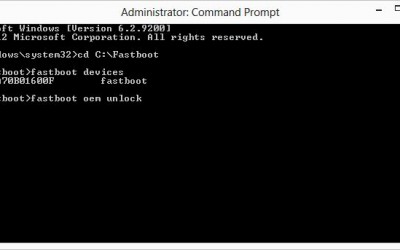
  6. Then enter the command below to start the unlock bootloader process on your nexus 4
    fastboot devices : this should detect your device ID, if don't detect you must re install the driver
    fastboot oem unlock : this will unlock the bootloaderUnlock Nexus 4 Bootloader
  7. Then after finish your device will restart and boot into normal mode

for the root tutorial go here : tutorial root nexus 4
If you want to relock the bootloader its easy just change the fastboot oem unlock to : fastboot oem lock.
Needless to remind you that unlocking the bootloader will void warranty officially. Done so at your own risk.

Easy Tutorial Rebrand Sony Xperia U

The following guide is used to remove the brand on Sony Xperia U so you can receive official updates by Sony and not by the brand which usually takes much longer, because the brand needs more time to develop the firmware
The guide is tested and works 100%, however we assume not responsible if you don't successfull when you do it by yourself

how to rebrand xperia u firmware

Requirements


  • Download Sony xperia u firmware
  • Inside the folder you will find: the Official firmware from sony for xperia u, The Flashtool and 1 folder to add to flashtool so that it can recognize your device.
  • For the the driver Sony Xperia U driver you can download here fownload driver for 32 bit | for 64 bit


How to Rebrand Sony Xperia U
below is the instruction for flash official firmware from Sony for Xperia U
  1. Download pc companion or SEUS Official SONY site or install it from your device and just finished installing and its driver is loaded, proceed with the next step
  2. Extract on your desktop the folder Xperia U ST25, enter the folder and install it instead for flashtool who owns an older version should upgrade to 0.7.1.0 version
  3. As soon as the installation is finished go back to the desktop and go into the folder XPERIA U ST25 removed before entering on flashtool then in the folder inside the device and select and copy the folder ST25 hours head to the resources of the computer and then to the position of the main hard disk where we installed flashtool, go inside you will find the folder device revenue here and you will have a list of devices glue the ST25 pocansi selected folder and you're done.
  4. Back again in the extracted folder on your desktop and enter XPERIA U ST25 official firmware and select by copying the file ST25_6.1.B.0.564_Generic now for the last time go to My Computer then oh computer hard disk finally main revenue of flashtool yourself in the firmware folder and paste the file selected above can now close everything.
  5. Now all you have to do is start the program and select flashmode, then select the firmwares I recommend to follow the instructions that will appear on your flashtool.
  6. Then after finishing I recommend to start the phone to boot and repair (although it says that the software is up to date) with seus or pc companion for warranty issues.

Now you have successfully rebrand your Sony Xperia U if before your device firmware is from some brand such as vodafone, O2 or another brand. Now you can follow my next tutorial about Install ICS on Xperia U. Stay tune with Tutorial update android

Samsung Galaxy S3 S voice Commands

Here you can see a review from Samsung Galaxy S3 usage with focus on S voice and the additional app voice commands.

Start S voice
You find S voice as an installed application in the menu and you can place naturally like any application on your homescreen. In addition, it is stored as a standard double press of the home button directly calls on S voice. If you do not need this feature, you can turn them off. S voice, opens to the press menu button > settings > S voice open (uncheck). As less for everyone S voice not so often use tip on the edge. Normally, your wait Samsung Galaxy S3 after pressing the home button double-click a commemorative second on the possible. If the function has been disabled, it comes a small little faster back to the homescreen.

First you can read my previous post about : S voice For Galaxy S3, the rivals for siri

Samsung Galaxy S3: S voice and app voice commands

If you you interested what has to offer S voice in bottom right clicks the question mark but when open voice control or simply says "Help". Alternatively, you can find the detailed list of examples within s voice on the menu button > settings > help.For those who have still not Samsung Galaxy S3, there the list short and at the end of a collection of all the examples as screenshots.
s voice commands on galaxy s3
galaxy s3 s voice setting


How To Use S voice
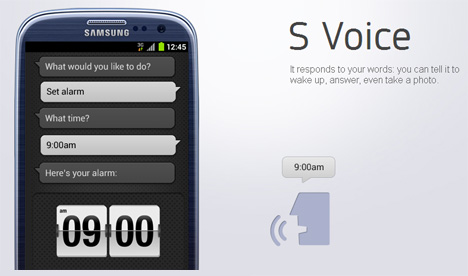
The principle is always the same, to configure it presses the microphone button below or you activate the Samsung Galaxy S3 voice control by the saying of "Hello Galaxy". If this command not like you, this can be adapted: menu button > settings > help > S voice alarm command > change now.

From here, the wild fun begins and you can dictate your requests. For my feeling, it works overall pretty neat with recognition when you speak at an appropriate volume. This is possible in a quiet room alone at home as a whisper, in busier areas, one must be also very clear.

I felt flexible the detection of commands as a right. The time of rigid command pattern, you had to keep 1 to 1 is over. Whether you now short and crisp says "Timer a minute" or "Do please a timer on a minute" is up to you. The bottom line will appear and you can confirm, change or cancel. When the timer or alarm clock a time also serves as link in the corresponding app. So not quite matches or you want to configure your alarm even down to the last detail, this is not a big problem.

It also works with questions to the address book. Show contact invites you to the appropriate contact and you could open it on request. What has surprised me very positively, is that properly identify by name. All participants (more than 200) are created with full name and surnames in my address book. The recognition is very good and also the right people will be found, despite partly identical name or surname. Here, the benefits of voice control is exhausting but also my opinion. If you have many contacts with multiple email I can find the correct entry addresses and various numbers out of habit to date even faster by hand unlike the voice control.

S voice: change voice of the Samsung Galaxy S 3

When the sound manner of your Galaxy s 3 to you says you don't like, then you have to accept so. Settings > language and input > text to speech > Sasmsung TTS (set point) > gear > Samsung TTS settings > General settings > language effects. The Available options are:
  • Normal
  • Deep voice
  • High voice
  • Weak voice
  • Strong voice
  • Robot voice
  • Helium gas effect


Should really each time be yourself in the 6th. By the way is the system-wide speech, in this sense, have fun with Google Maps Navigation.

S voice: What works and now works

what works or not on voice commands

The two screenshots show my two previous defeats in connection with S voice. The first was an attempt to start a conversation that does not fit the prefabricated commands and this went straight to the pants. Where I am sure that we will find a few nice Biegsame here with time.

The second image shows an error that unfortunately more than ever has occurred. Apparently I was properly understood, but the command was incorrectly evaluated and the timer is set to zero. We hope on a software update which closes this gap. Since all requests need to eh about the vlingoserver, this could be solved possibly even server-side, without an update on the S3 itself.

S voice app commands
Outside s voice even more voice commands available are for the Samsung Galaxy S 3, if it has enabled this because. A look into the appropriate menu and further: settings > language and input > app voice commands (a slider and click on text for more options).

  • Incoming calls, accept or reject
  • Stop the alarm or to repeat
  • Camera trigger
  • Control music playback: next, previous, volume up, volume down
  • Radio: change channel, volume up, volume down

The screenshot shows the details.
list of voice commands


My personal favorite is clearly the camera control, because thus I can beautifully capture the device and must not fall on the display. A separate camera button would have also solved this problem, but it is nice but too made.

For me, these features show that it takes probably more than a few days to fully exploit a Samsung Galaxy S3. Here, there is potential to make our lives easier is certainly for many of us. While switching off the alarm you should reconsider yet again if you get accustomed to first off, I see bad come. ;)

I find it very convenient that you can activate each function separately or turn off. Listen for incoming commands will need also electricity and thus I can decide for myself what I really need.

Conclusion
It not all gold that glitters, and I don't see me in my everyday life always yet, how I give spoken commands to my phone. Especially that dictate messages in public is not an option for me. It will not be probably also large dictation in the car, because the background noise is too fast and too big in my small car. If a time has made the whole of you over a Bluetooth headset, like to share in the comments the experience.

Nevertheless the whole making produced on s voice commands after first reservations and just the voice commands are outside s voice certainly good to integrate if you start to think about it. Otherwise, for the first, there are the small commands that you have done to me. Pizza in the open, double click "Timer to 20 minutes" and is good. :)

How To Install S Voice For Samsung Galaxy S2

We know that S voice is new technology developed by samsung to compete with apple siri. On this post you can read about tutorial install S Voice On Samsung Galaxy S2. We talked several times of the Samsung Galaxy S 3 and S-Voice such as on this article S Voice For Samsung Galaxy S3 alternatives for siri , the new voice dictation / command service that Samsung has installed on this new Android smartphone.

With the S Voice service draws on Samsung now: Who wants his Android phone to give instructions, must develop the upcoming flagship phone Galaxy S3 and Galaxy S2, as for other devices, the service is not yet planned. So it at least allow the developer to work for the best.


how to install s voice on galaxy s2


Today, we will see How to install S Voice for Samsung Galaxy S 2, the previous model of Samsung, on which the installation of S Voice brought some trouble for some users. Let's see how to install S Voice .

Requirements

Tutorial Install S Voice On Samsung Galaxy S2

  1. Download this archive from this link http://adf.ly/HZpEk, unpack it and copy the two files in any folder (create it from scratch) within the Galaxy S 2.
  2. Open Root Explorer
  3. Go to the /mnt/sdcard folder (if you copied the files in the internal memory) or /mnt/emmc (if you have them copied to the external memory)
  4. Go to the folder where you copied the files previously
  5. At the top you will find a statement saying Install R/W, press it. This step allows you to write system folders
  6. Press and hold on the file voicetalk.apk to the contextual menu, then select "copy"
  7. Go now in the /system/app folder and paste the file you just copied
  8. Now, always in /system/app, hold on voicetalk.apk and in the menu select "permissions", to read as follows:
    s voice for galaxy s2
  9. Go to the folder where you originally inserted the file and copy libsvoctts.so
  10. Paste it in/system/lib
  11. Close Root Explorer and restart your Galaxy S 2.


Well, we had finished the installation process, it so simple, fast and easy to do. Now you can enjoy your voice assistant on your device. don't forget keep follow us Android Aplication review
If your device still not supported you can go to my post about : siri alternatives application for android

S Voice For Samsung Galaxy - S3 Siri Alternatives For Android

Samsung has finally revealed all about his new flagship, we are talking about the Samsung Galaxy S3. One of the most impressive features is the S Voice, the rival of Siri for iPhone, created specifically for Samsung Galaxy S 3. Speech commands are similar to the ones we've seen in stocks on other Android smartphone, but it is evident that the software has taken countless steps forward.


S Voice For Galaxy S3 is The Rival For Apple Siri

s voice for galaxy s3

If you are use another android phone you can choose siri alternatives app : siri alternatives apps for android

What is S Voice ?
Samsung has improved the experience to compete with Apple's Siri. For example, s voice allows you to unlock your phone with a verbal command, customizable, and then receive instructions in order to upload applications, change calendar appointments, do research or do other tasks just by talking on the phone.

"How is the weather today?", "take a picture" and "Cheese!" Are all supported commands. If you're listening to music, you can tell S Voice to jumping, go back, play and pause put a song and many other commands.

S voice Features On Samsung Galaxy S3

An important s voice feature that is the fact with the Samsung S Voice you can actually open and launch applications with your own voice, and not only to check the weather forecast and set an alarm. While driving you can launch Spotify music streaming, open Google Maps , and much more, all with S-Voice. This brings voice commands to a completely different level, considering that Samsung has imagined what users would actually do with S-Voice.

Tubemate : Download Youtube Videos From Android Phone

There is some app that allows us to convert and download videos from Youtube in better format as mp4 and in the case of course music to mp3. Save your favorite Youtube videos on your Android smartphone has never been easier, much simpler than many procedures to do it on PC. Let's see how to do everything via TubeMate.
One of the most popular uses for android smartphone or devices is to take advantage of streaming videos, contect, films, television and music and one of the most common ways is through the FLV format. However, it is a disadvantage to save FLV content as it is much more problematic playback and quality suffers.

Download Youtube Videos With Tubemate

One of the reasons for the android smartphone holders pride's  against those who have an iPhone or iPad is that you can see and download youtube videos without having to jailbreak.

The whole thing is very simple thanks to a TubeMate most useful programs from across the media category of the Google mobile operating system.

It must be said that for unknown reasons, while the android market does not always display all programs, doing a search with the name of the program you might find the suggestion to name the application "tubemate" (which proves that is part of the market), but without that then manages to find the installation file don't worry because there is a very easy to install and maintain for future reinstallations.

DOWNLOAD TUBEMATE
First we go into the android settings to enable the installation of external programs to market (as shown in the following image), then from your browser go to the following address : download tubemate and download the program directly from the official site.

download youtube videos from android phone

You can download this directly from your phone or from your computer, in the latter case, you must then pass the apk file in the Terminal manually, via usb, wifi and microsd (depends on the characteristics of your Terminal). After installing you can enjoy and download youtube videos from android

Anyway, I recommend that you save the file for future use, because even if they are new versions (tube mate enjoys an excellent support from its authors who update often enough) the program will first check start looking for any available upgrades and offering direct updating. Now lets continue to the tubemate settings part

How To Download Youtube Videos From Android Phone

  1. Download tubemate, if this link doesn't work you can find the download link from the picture above
  2. Using the search function at the top right will write the name of the clip that interests us
  3. Select the video from Youtube
  4. In the window you will find the Save button
  5. Choose the type of format that you want
    download videos with tubemate
  6. Once chosen we can monitor progress in Menu-> Download

Finish, Now after read this i hope you can enjoy youtube videos anytime you want on your android phone by download it and save to your memory

Polaris Office 4.0 Free For Android Phone

If you need to modify Word documents on your android smartphone there are several applications that are right for you but be prepared to pay because some of the office application isn't free. Now you can get Polaris Office 4.0 free download then you can install it on your Samsung Galaxy S3

This time, there are free Polaris Office 4.0 for the Samsung Galaxy S3. The app was directly at me at the launch of Samsung apps. If this is match with your android phone, you can just search for "Polaris" on google. Unfortunately, this app just for the galaxy S3 and not for other Samsung devices is available. With Polaris Office, you have a complete Office solution (so similar to MS Office or LibreOffice) for Android. It comes always at some point in the situation that you have to open an Office document and in this case if your Polaris have preinstalled Office on your S3.

POLARIS OFFICE 4.0 FREE

polaris office 4.0 free

Polaris Office offers all the functionality and compatibility with MS Office on this PC. You can download the app in the end of this post. With this application, it will be possible to view and edit all types of documents such as:
  • Word
  • Excel
  • PowerPoint
  • Adobe PDF

So now if you want to download the Polaris Office 4.0 package, you can do it by go to the Samsung App Store visit there and perform the download. And now seems that Samsung decides will release Polaris Office 4.0 download for other smartphone models in the future.
Download Polaris Office if you want to save apk from directly from playstore read how to download apk from googleplay

Tutorial Flash Firmware On Samsung Galaxy S2 Via Odin

Today i propose the leadership base that every good android smartphone owner should know: how to flash a Firmware via Odin on Samsung Galaxy s2. Odin is a program very similar to J.A.F. to replace the smartphone Operating system as if it were new, or load a custom rom.

Finally, after almost 2 months from the date of the announcement since March 2012, it was only the user and the owner of the Samsung Galaxy s2 GT-I9100 & GT-I9100G received the android ice cream sandwich update. The news excited is for the owner of a Samsung Galaxy S2 because now able to upgrade Samsung Galaxy S2 to ICS 4.0. So now i will show you tutorial flash Firmware via Odin.

Read First
  • Please follow all the step that i mentioned below for good result
  • Do with your own risk


Tools Required


Safety measures before commencing the process of flashing

  • Do Nandroid Backup
  • Make sure your smartphone batteries are in the stage of no less than 80% full.
  • Make sure you have install Kies on PC/laptop.


How to Flash Firmware Via Odin

  1. Make your device into USB Debugging Mode ( Settings-> Applications-> Development-> USB debugging )
  2. turn off your smartphone .
  3. Turn your phone to Download Mode by pressing button Volume Down + Home + Power simultaneously for a period of 5 – 10 times until appear Warning and click button Volume Up to continue.
  4. your phone will expose the exposure of Downloading, Do not turn off your phone
  5. Start Odin in the PC/laptop.
  6. Connect your smartphone to your PC/laptop using a USB cable.
  7. Wait for a few moments so Odin identifies the smartphone.tutorial flash firmware via odin on galaxy s
  8. NOTE : make sure you do not tick anything except the Odin Auto Reboot and f. Reset Time (default)
  9. Click the button and choose the PDA firmware that you have download and extract before this. (Also make sure you select the correct firmware for your model smartphone you) – File firmware file md5 tar
  10. Click Start, and the process of flashing will be done. Smartphone you will reboot automatically after process flashing finished.


Now after we completed all the step, your Samsung Galaxy s2  now have been flashed with Android ICS 4.0.4. After flash new firmware via odin if you want to get root access read on tutorial root samsung galaxy s2 I9100.

Samsung Has Launched The Galaxy S4 Secretly In CES 2013 ?

In a recent report that we could learn that Samsung would have presented at CES 2013 its new flagship smartphone, is the Galaxy S4. The presentation should take place behind closed doors in secret with the mere presence of those few people invited to the event press. In this regard, there are new rumors that we cannot confirm the 100% but that would disclose any interesting news about the new smartphone.

Firstly, there was the much rumored closed door presentation of the galaxy s4, a smartphone that mention working perfectly with no problems whatsoever and with software aboard a TouchWiz UI heavily customized. The Samsung Galaxy S4, always according to the latest reports, would be very similar to your smartphone with YOUM display presented by the company during the CES 2013, with a curvature of the display located on the sides which would arise as an extension of the whole user interface. The same curvature would be present on Galaxy S4. If you don't know read first what is YOUM Display

galaxy s4 secretly launch in ces 2013


In this way it would be possible to display in horizontal text messages and icons in the side of the smartphone, characterized by curving outwards. Thanks to this it will also be possible to see text messages scroll on the side of the display without unblocking of all your smartphone to view them.

Details don't seem to be received even though we're pretty sure that the device will have a 5 inch display with Full HD resolution. The will that expressed by Samsung at the event just ended is to want to equip new YOUM display on Samsung Galaxy series devices in the near future, which now looks really close.

Ultimately we remind you that all this information is to be taken with some caution because we cannot have full assurance of the reality of things. We leave you with a question to which we hope will answer many: according to you it would be useful to a display like that on a smartphone or you think YOUM displays should be used only for the creation of new types of devices as accessories or anything?

Samsung Introduces Youm Display and The Green LCD In CES 2013

It's for a very long time that Samsung is make discussion about themselves not only as regards its Android Device but also as regards the flexibility of OLED display. Finally at CES 2013 Samsung officially presents the new generation of flexible display called Youm display and also a new display type called Green LCD.

What is Youm Display

The flexibility from Youm display are realized with OLED technology, so basically they're like AMOLED display collapsible.
Their use, although now may not be fully understood, is varied. In fact we think for example to devices like the Galaxy 2 Notes, is very large, buwith this new display type can get smaller because of the display can be folded on itself. This should reduce considerably the dimensions, all to the advantage of portability.
youm display galaxy s4

Below we have listed the images and the first video of the first Samsung smartphone with the new display Youm, whose use is not yet clear when there will be and at what price, although we can imagine that devices with this kind of display will be quite expensive.


oled display technology

whati is youm display


The Green LCDdisplay are not displays will find employment in smartphone field but in the tablet. It's power-saving screens that are able to consume 25% less than what we have today, all in favour of greater autonomy on your device.

Conclusion

In conclusion, although it is not certain, we can speculate that the Galaxy S4 will use Youm display and we dream it can be equipped with an Exynos 5 octa core like that presented a few hours ago.

Samsung Exynos 5 eight core processor | CES 2013

The new generation of hardware for the mobile never ceases to amaze, in this article we will discuss about new eight core processor it is exynos 5 Octa. These days, at the CES in Las Vegas, all major manufacturers are showing new products they intend to introduce for this year: first, with the new NVIDIA Tegra 4 and its amazing performance; Qualcomm with the new Snapdragon; last date is Samsung, which presents the new Exynos 5 Octa. As the name suggests, it is eight-core processors.

Actually there are eight core processor as we used to think: as in Tegra 3 and 4 there is a fifth, called core from NVIDIA "companion core", so in the new Octa 5 Exynos there are eight core for high performance and energy-saving core. The 4 core Cortex-A15 operating at 1.8 GHz, designed to address situations where serves brute power, are in fact joined 4 core Cortex-A7 with 1.2 GHz frequency which allow you to handle situations that require relatively little computing power and that it is imperative to saving.

The procedures are similar to those already seen on Tegra, with Cortex-A5 and A7 which operate until you start an application that requires a lot of resources (e.g. games), when you start the 4 core Cortex-A15 poking into her own hands. All eight cores are manufactured to 28nm and exploit the technology of big ARM ".LITTLE ". Icing on the cake is the use of a new GPU(kinds of android GPU), as announced by Samsung, can double the performance by lowering the consumption of 70%.

Exynos 5 With 8 Core Processor

samsung exynos5 eight core processor

There are no news about smartphone or tablet that can use this chip, but certainly over the coming months we will see the first devices that take this fruit of high technology.

Weather Forecast Application For Android Device

Today i will share and give review about a new application for weather forecast. But this is not usual app, because on this app is available for Android smartphone, or another android device
Weather Life is an Italian program and the name of the program is Meteo Life, very nice, precise and accurate for the weather forecast on your smartphone and tablet.

Meteo Life is a Weather application and Weather Centre for Italian and also worldwide and offers weather forecast on our smartphones and Android tablet. On Google Play Store there are many apps for weather forecasts on Android, but this different from the competition for some important aspects.

The Excess Of Meteo Life Weather Forecast

First of all, the Meteo Life Weather Life Forecast for android allows us to have weather related notifications, to seaside and mountains in Italy and all over the world with great accuracy.

In addition, Weather Life's interface on Android, despite being quite simple, it is very clean and allows you to navigate menus and sections using the left area through a swype.

Despite being very simple, therefore, the features offered are so many and all very useful and comfortable, easily accessible in just a few clicks.

But the program, plus up to 15-day forecasts, offers daily forecasting information divided into sea level details and timetables, in order to provide the maximum of information, accurate and updated in real time.

Among other information available, for example;
  • the State of the sky
  • minimum and maximum temperatures
  • twenty
  • freezing level
  • Snow stake
  • alerts of major meteorological phenomena.

meteo life weather forecast appweather forecast app for android

weather life forecast application android


But the Weather feature Life doesn't end here.
We find also the comfortable "weather travel" feature, that allows us to know the status of the sky en route of the journey that we are facing.

In addition, the alert data section, we can select the events stored in your calendar and then click weather alerts that we are interested to be informed about real-time weather conditions with comfortable notifications.

Download Meteo Life

you can download meteo life bo follow this link : download meteo life from playstore
you also can save it to apk, read : how to download apk from playstore
Finally, the application is complete with radar, satellite and forecast maps, a window on changes in weather nowcasting or to discover future scenarios. What else could we ask such a program? I think there is really everything!

Truly a complete apps for weather forecasts on Android, with the option of adding various locations as a favorite, to see real-time weather forecasts of cities that interest us. This application Really worth to try!

Bluetooth A2DP problem on Android will solved in next update release

Google from android bug tracker confirm will solved the bluetooth a2dp audio streaming in next android update. It's official that we learn in a story very comforting that we hope will be accompanied by other information on the upcoming release of Android. In fact, Google has confirmed a few minutes in the next release of Android will be solved the bug audio streaming via Bluetooth A2DP, which makes it currently impossible more often than not hear the audio.
solve a2dp bluetooth problem on android

This problem has been posted in the section concerning the Nexus 7 but it's a General fix that will be applied on all Android devices can be updated to the newest version of the operating system. Unfortunately, however, it was not possible to find information about the next version of Android but, with a probability of 90%, we believe that will be the 4.2.2, which is a minor update that will correct presumably this and other minor bugs.

google confirm fix a2dp bluetooth problem
source : android bug tracker

Android 4.2, you know, was released with some bugs to fix such as in this case the bluetooth a2dp problem, and little by little it seems that Google is solving them, although to be honest we expected a more convinced reaction and quick by developers of Android.
Lastly, no information seems to be leaked, even regarding a possible release date of the update, but we hope to not have to wait long. The next version of Android now seems very close to release officially.