Pages

Pages

Nexus 4, Nexus 7, Nexus 10 Officially Announced

Google just announced on the official Google blog, the price and availability for the Nexus 4, Nexus 7 with 32 GB and 3G and the Nexus 10. Thus, all three devices are now officially released. In addition, we are excited about how low the prices for all high-end devices are.

Hurricane Sandy has forced Google to cancel the event in New York, but the Mountain View company has, however, announced the new products of the Nexus family. The numerous rumors in recent weeks are now confirmed with the launch of the nexus smartphone Nexus 4 and Nexus 10, accompanied by a  model with 32 GB of memory, the Nexus 7. For all these devices, Google has developed Android 4.2, the new release of the operating system that introduces a number of new features and improvements.

Google Nexus 4

nexus 4 release

The Nexus 4 is a smartphone with True HD IPS display Plus 4.7-inch (1280 × 768 pixels and 320 ppi) protected with Gorilla Glass 2, quad-core processor Qualcomm Snapdragon S4 Pro 1.5 GHz, 2 GB RAM, 8 or 16 GB of internal flash memory (no micro SD slot), dual cameras (8-megapixel rear and 1.3 megapixel front), WiFi 802.11 b / g / n, Bluetooth and NFC chip. The 2100 mAh battery provides up to 10 hours.

As was done by Nokia with the Lumia 920 and 820, Google decided to integrate a wireless charging system compatible with the Qi standard. This should allow you to use the same accessories designed for smartphones of the Finnish manufacturer. Google will offer its still a device called Wireless Charging Orb. It is an object of spherical shape "sliced" with an angle of approximately 45 degrees to allow the support of the Nexus 4. Both the charging dock that the smartphone is equipped with magnets that prevent slipping of the device. Daydream functionality included in Android 4.2 allows you to view photos, news from Google Currents and other information even when the Nexus 4 is charging.


Google has not signed any agreement with the U.S. phone operators and then the Nexus 4 will be "unlocked". No support for LTE networks, but 3G HSPA +. The sale of the 8 and 16 GB versions will begin on November 13th on Google Play store in the U.S., Canada, UK, Germany, France, Spain and Australia. Prices are respectively 299 and $ 349. The 16 GB version will also be available through T-Mobile for $ 199 with a two year contract.

Google Nexus 10

After the 7-inch model, Google announced a larger tablet based on Android 4.2 Jelly Bean. The Nexus 10 has a 10-inch screen Super PLS with an impressive resolution of 2560 × 1600 pixels (300 ppi). The hardware includes a dual core processor Samsung Exynos 5250 1.7 GHz (ARM Cortex A15) with Mali T604 GPU quad core, 2 GB RAM, 16 GB or 32 GB of internal memory, 5 megapixel rear camera and front 1.9-megapixel, micro USB, micro HDMI, two NFC chip, stereo speakers, Bluetooth 4.0 and WiFi 802.11b/g/n.

The 9000 mAh battery provides up to 9 hours of HD video playback and 500 hours of standby time. The thickness of the tablet is 8.9 mm, while the weight is 603 grams. The Nexus 10 will be on sale from November 13 on Google Play in the United States, United Kingdom, Australia, Canada, Germany, France, Spain and Japan. Prices are $ 399 for the 16GB model and $ 499 for the model 32 GB.

Google Nexus 7 32GB and 32GB + Mobile

nexus 7 tablet hands on

For the younger brother of the Nexus 7 Google has reserved a double novelty. The tablet will be available with 32 GB at $ 249, while the 16GB model will cost $ 199. Exits from the catalog 8 GB model (sold only in the U.S.). The 3G version also comes with support for HSPA + and Android 4.2 at a price of $ 299. The tablet will be "unlocked" and, like other products, can be purchased by November 13 on Google Play Store in the U.S., Canada, UK, Australia, France, Germany and Spain.


There is still an atmospheric video that shows all three devices as well as a few of the new features of Android 4.2 in action:


Google Play Music: Streaming Music via PC, Smartphone and Tablet

From November 13 also english users (as well as those of Spain, France, Germany and the United Kingdom) will have access to the contents of Google Play Music by free. The availability in Europe of music storage service launched in the U.S. about a year ago can be summed up like this, with a good news for users of the Android platform. Google Play Music, formerly Google Music is a music streaming service from Google. About this you can even play music that have been uploaded, either through a web interface in the browser or through on your own Android App
google play music streaming via phone

Platform

thanks to the agreements that the house in Mountain View has made ​​with the recording industry - pointing it decisively transformed from a simple operating system (with its market applications in tow) to large square for digital entertainment on the move. On a global scale, and challenging, needless to say, the ecosystem of Apple - that the tablet is still the clear winner in tandem with the iPad - and the (not least) of Amazon.


How does the new creature of Google? What are the differences, for and against, with itunes? Play with Music, this is one of the advantages that the giant Californian brings to the table, you will have access, even from mobile devices, even music catalog of Warner Music Group, one of the last major of the disc to sign a licensing agreement with Mountain View.

How to Use Google Play Music

For tutorial how to use this service you can on my other post about How to use google play music


Google Play Music Streaming

From the technical point of view, the peculiarity of service refers to the so-called "scan-and-match", through which you can scan automatically the music in memory of its Android smartphones and tablets and to avoid loading one by one online songs. In short, only those not in the library in the cloud will be sent once the scanning and synchronization between the various devices. This is to avoid unnecessary waste of time and resources (battery terminal in the first place), just as with iTunes Match and how it also provides the service of Amazon.

Google Play Music, and this is her dowry quantitative offers free upload to the cloud than 20 thousand pieces: always using the same Google Account (to Gmail for instance), you can play music files by streaming mode from any smartphone, tablet, or pc(pc including desktop), like all other online services made available by BigG. Under a first substantial costs emerges marking with the proposed Apple: iTunes Match is indeed a fee, € 25 per year subscription and the Amazon Cloud Player is free yes but only just 250 pieces (any other space required has rates to rise). On paper it is not, for Google, an advantage of little consequence.

There is a gap that Google Play Music still has to make than iTunes? Yes there is, at least in united kingdom, and the lack of a catalog of films that instead Apple offers for months in its Store. Google Play Music (and the same goes for the Amazon service) will be limited initially to offer a catalog of apps, books and of course music. Lack, that of the film, which will affect consumers in the process of buying a tablet for Christmas? Will tell the store. What is certain is that Google has overlooked the issue and the video shows that the close agreement with Twentieth Century Fox is aiming to make available (either for sale or hire) Play Movies with a rich catalog of films and television series, in pendant which is the ability to access a bouquet of magazines in digital format ranging from People to Time.

The announcement to Google Play Music in Europe is accompanied by another element that Google has placed on the chessboard, and the number of apps available for Android devices. Play by the shop today are in fact 700 thousand programs downloadable via mobile phone or tablet, a number that almost cancels or the difference with the Apple App Store and marks a break with the groove of Microsoft Windows Store, which has reached 120 thousand applications at the same time with the launch of Windows 8 and Windows Phone 8. Then how many of these apps, in the three stores mentioned above, are never taken into account by all users (and there are many) is another matter.

Google Nexus 4 Officially Released

Without an extra event, After we all know that yesterday google have cancelled android playground event. The google event cancelled because of hurricane. And Today Google has just announced a bit of news of their new smartphone release. With this, the Nexus 4, which is built by LG the Various details about the device were already known, And we also have an official confirmation.

The Galaxy Nexus 4 comes naturally with Android 4.2 and therefore some new features are will also included to the market. Particularly noteworthy, the price will be, as the unit will cost in the 8-GB version only for 299 euros. For the 16-GB version will be 50 euros more expensive, so if you want the 16 GB you need 349 euros. The Release date of Google Nexus 4 is in the 13th November, the device is available on play store.


Features

Galaxy Nexus 4 Specification
  • Qualcomm Snapdragon S4 Pro processor with 1.5 GHz quad-core CPUs Krait
  • Android 4.2, Jelly Bean
  • 3G (WCDMA), HSPA +
  • 4.7-inch WXGA IPS True HD Plus display (1280 x 768 pixels) 320 ppi, Corning Gorilla Glass 2
  • Memory 8GB / 16GB
  • 2GB RAM
  • Camera: 8.0 MP rear and 1.3-megapixel HD front
  • (Permanently installed) 2,100 mAh Li-Polymer battery
  • Size: 133.9 x 68.7 x 9.1 mm
  • Weight 139 grams
  • NFC
  • Wireless charging


NEXUS 4 FROM EUR 299,00 AVAILABLE IN 13 th NOVEMBER
lg nexus 4 official release

Tutorial Hide Folder On Android Smartphone

By default, all images and videos available in the Android smartphone will be displayed in the gallery which is stored in the internal storage or external storage (microSD), and there is a things that not so pleasant, as every individual must have an image or a video that does not want to be accessed by someone else . Has become a normal human being (someone maybe your friend), when you see or hold the smartphone, the first thing accessible is the camera or gallery app. To avoid such things happen, please follow the simple tips below how to hide folders and images from gallery in your Android smartphone.

Requirements

  • Android 4.0 ICS
  • Does not require root access
  • Smartphone your own file browser function. Eg MyFiles applications available in Samsung releases smartphone model
  • NOTE: There is no guarantee this method can be applied in devices that use Android Gingerbread or Honeycomb version as I only do testing in ICS 4.0 devices only.


How To Hide Folder And Image From Gallery
  1. Create a new folder on either internal or external storage (recommended) use a file browser application
    To Download Myfiles paste this url to your browser http://adf.ly/E9b3Z
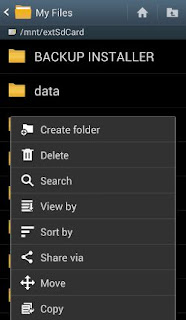
    Eg: - MyFiles -> extSdCard -> Menu -> Create Folder -> enter a folder name eg "TOP SECRET" -> Save.
    hide folder on android
  2. Move all the video and image you want to hide into that folder.
    Eg: - DCIM folder (images from the camera) -> Menu -> Move -> Select All ->select the desired image / video -> Done -> browse to the folder "TOP SECRET" -> Done (wait until the move process is complete).
  3. after the transfer process is completed, rename the folder "TOP SECRET" by placing a dot (.) In front of ".TOP SECRET" and Save.
  4. Here's how: - Hold your "TOP SECRET" for a while -> Rename to ".TOP SECRET" -> OK. Folders ".TOP SECRET" and in it are no longer displayed in the file browser and gallery.
    hide file on android
  5. To access the folder. "TOP SECRET": - File Browser (MyFiles) -> Menu -> Settings -> tick Show Hidden Files.

Ok, done!

Tips hide folders and images from gallery can also be applied to any - any files, documents, images or video are independent. However, I suggest that your file is stored in a folder that easy to remember.

Jelly Bean Wallpaper and Boot Animation Download

Of course, under Jelly Bean again some exclusive wallpapers and animation on its own boat animation. If you do not want to wait until the launch of Android 4.1, You can find and get it is all wallpaper and also the boot animation here in this article. These were originally extracted from a Galaxy Nexus, which allowed for the Google I / O make the rounds.

To Apple This Jelly Bean wallpaper on your android individually, you can simply insert the following APK install. After installing the Jelly Bean Wallpaper APK can be found in your wallpaper settings the corresponding entry to the new Jelly Bean backgrounds.

jelly Bean Wallpaper Collection


Above is only some of example wallpaper that included on the installation.
If your device is have root acces, there is also an official Galaxy Nexus Boot Animation . So everything works out, to apply this boot animation you have to place the bootanimation.zip to your SD card and then move from there via Root Explorer, then place the file in the direction of / system / media /. Course is recommended before the whole a backup !
Download The Jelly Bean boot animation here
To backup you can use this tutorial : How to perform nandroid backup

Jelly Bean Boot Animation
Below are a quick video of the new boot animation:

Picture Password Windows 8 Lockscreen for Android

I am not a big fan of Windows 8 the OS might looks very good, but still holds countless construction sites. One thing that I like about the new system, but besides that also The Windows 8 Lockscreen In principle, you are welcomed with a simple image that you have to touch the right places in order to unlock the PC. Extremely minimalist and simple in practice. If you one of people that like this Windows 8 Lockscreen, I have good news for you: Give Thanks to this small app "Picture Password". Picture password is now the same lock screen feature for Android.

This the app is relatively new, to configure this lock screen you must draw first the lock pattern on the actual image . This lcok screen is not much to configure this unfortunately also means that, for example, their own music (still) can not be controlled by the Picture Password lockscreen. Your can unlock a total of lines, circles and / or points exist.


Requirements


  • Root is required for phones with on-screen navigation bar (Galaxy Nexus, Moto Razr M/HD etc.) and for some phones to disable the status bar


Get Picture Password


You can find Picture Password for Android here in Google Play Store . The developer is also a Pro version for EUR 2.68 willing to unlock a few more functions.
Too bad that Google does not come up with this great way of Lockscreens! What do you think of Picture Password for Android?

You also can find anothe lockscreen for android on my post about download best android lockscreen

Tutorial Install Cyanogenmod 10 Jelly Bean On Galaxy S I9000

After maybe for a long time use cyanogenmod now you can try the new version. The new version is called Cyanogenmod 10. And today i will share how to install this custom Rom on Samsung Galaxy S I9000. And once again we must give thanks to the developers from cyanogendmo so that you can Install Cyanogenmod 10 on Galaxy S I9000. Galaxy S is one of the Samsung flasgship smartphone. Before Maybe all of you that use Samsung Galaxy S have enjoyed the Official CM 9 ICS 4.0.4 and now you can enjoy the unofficial Android 4.1 Jelly Bean release. Developers have succeded to port Android Jelly Bean to Galaxy S but there are little bugs. But don;t worry becauese the developers steam still work to get the best and i will update to this blog too so you can enjoy the perfect rom. Samsung Galaxy S is the first Single Core Processor smartphone that get the Jelly Bean port.

install cm10 on galaxy s i9000

This custom rom is developed by mkalter which is a XDA dev forum member so that can be easily flashed to Galaxy S using CWM recovery. besides this rom actaullay There are few more projects is being created to bring stable Jelly Bean roms to Galaxy S. But CyanogenMod 10 is the best. And this version is also still under development and it will be the best Jelly Bean custom ROM option for Galaxy S i9000 users.

Cm10 features On Galaxy S I9000

  • Touchscreen
  • GPU
  • capacitive keys and hardware keys
  • Butter Smooth UI
  • USB port
  • Wi-Fi
  • 3G
  • Google Now
  • Bluetooth
  • Camera and external SD card are working fine


After installing this rom there you can see devil kernel config app. It is Important to do: Open it and change the Ram from 377 MB to 403 MB. It will makes your device run more smooth.


Read First
Do with Your Own Risk

Requirements


  • Backup your Galaxy s I9000. you can read how to create nandroid backup
  • and backup your Images, SMS, Call Logs, Contacts, Videos, Songs, APN and MMS Settings.
  • make sure your battery state is more than 70%. it is important so in the flashing process your device are not turn off suddenly
  • Uninstall or Disable firewall, Antivirus And Samsung KIES from your Computer or device to avoid interruption during the update.
  • You must Enable The debugging mode on your Galaxy S i9000. You can do it by go through Settings > Applications > Development > USB debugging then tick the USB Debugging option.
  • Disable the SIM Card Lock on your device. To fo that you can go through Settings > location and Security > Sim card lock and then don’t check the tick mark the checkbox.
  • make sure you have update with the latest official Rom
  • You must have root acces
  • Install clockworkmod recovery.
UPDATE
New version of cyanogenmod have been released see on : install cm10.1 on galaxy s

How to Install Android 4.1 Jelly Bean On Samsung Galaxy S i9000
  1. Download Android 4.1 Jelly Bean firmware Update and google apps package. No need to extract them. Both files are in zip format.
    Rom file cm10allinone.zip download here.
    Addon google apps download here.
  2. After downloading them, Connect your device to PC via USB cable. And Copy both files into Phone SD card storage.
  3. Please Note: The ROM comes with an optional kernel with Voodoo colour, this kernel can improves the display colours. if you want to use this kernel, simply make a new folder named devil in your internal storage, then make an empty file named voodoo_color inside the devil folder. if you don’t want to use the voodo kernel Skip this .
  4. Turn off your device. Boot into Clockworkmod recovery. by, hold down the Volume Up + Volume Down + Power buttons together untill your screen turns on, Then your device will enter recovery soon enough.
  5. In recovery Select wipe data/factory reset, select yes Wait a while till the data wipe is complete. after do that your installed apps and settings will be deleted, but leave all personal files.
  6. Select install zip from sdcard, then select choose zip from sdcard. select the ROM. Confirm installation by selecting Yes – Install .zip file on the next screen. The ROM will start installing.
  7. Your device will reboot into recovery in the middle process of installation and then continue installing the ROM. Butt if after reboots but doesn’t continue installation, the repeat the step 9.
  8. After ROM installation completes, select choose zip from sdcard again, then select the google apps file that you have downloaded to install the Google apps package.
  9. After the installation of the Google apps package is complete, select go back then select reboot system now to reboot the phone and boot into HellyBean.


Congratulations Cyanogenmod 10 custom ROM based on Android 4.1 Jelly Bean is now installed and running on your Samsung Galaxy S.

Xbox SmartGlass Officially Arrives In Play Store

Officially announced a few days ago that microsoft xbox smartglass 2013 will also available for android. And today This Application is officially arrives in Play Store. Here goes now directly into the Xbox Play Store SmartGlass application that allows all users of Android devices, interface and enhance the fun with the Xbox 360 console. Xbox SmartGlass connects the phone with the Xbox 360 console by offering interactive experiences and rich unique content related to what you're watching or playing, right on the device in your hand.

Xbox SmartGlass for android

You will able to interact with TV programs, movies, music, sports and games, bringing the remote control to a whole new level. You can also keep in touch with your friends Xbox, check and compare the targets and change your 3D avatar. some of xbox smartglass android feature maybe can make you like this application. they are :

smartglass android feature

Xbox SmartGlass Feature
  • Exploring the Xbox 360 console by touching and sliding your fingers
  • Use the keypad of your phone to type text on the Xbox 360
  • Browsing the Web on the Xbox 360, using the keyboard and zoom functions
  • Play, pause, forward, rewind and pause videos and music on Xbox 360
  • Search in the complete catalog of Xbox music, videos and games
  • Amuse with rich interactive experiences offered by content creators gaming and entertainment selected
  • Check and compare your goals with your friends Xbox
  • Change your 3D avatar
  • Send messages to your friends Xbox
  • Change your profile Xbox

Note

The app requires access to an Xbox. Available for the majority of smartphone Android 4.0 + with screen resolution WVGA or higher.

DOWNLOAD


Name: Xbox SmartGlass
Developer: Microsoft Corporation
Price: Free
Get app from play store

Microsoft Xbox SmartGlass 2013 Also With The Official Application For Android

Microsoft seems increasingly willing to integrate the services offered by the Xbox platform, not just Windows Phone but also with other competing systems and after the announcement of Xbox Music coming soon in Play Store now Xbox SmartGlass Also Joins the list, a service that allows you to control various multimedia content directly from your Android smartphone.

smartglass 2013 for android


SmartGlass for Android will arrive in 2013 and for those which still unfamiliar with the power of this feature, it's basically allow your device becomes the interface with the Xbox360 console to control and interact with different contents such as playing movies and music, view information about the plot, actors or artists or to access the internet from the browser through the phone or playing games that will support the service using your smartphone as a controller using motion sensors.

There many other possibilities but remember to use this service you will need an Xbox Live Gold, and of course the application as soon as it is released in the Play Store.

Galaxy S3 paint probelms from various users

Lately, complaints about the Samsung Galaxy S3 accumulate at me, so I just want to pick up once the problem. Apple iPhone 5 when it was already here is, as far as processing or damage to the housing and also in terms of Samsung's flagship, the messages accumulate striking. The topic itself is already known to me for a while, but before I hastily put into the world, I once more waited quite a bit of feedback and Browsed relevant forums.

Galaxy S3 Paint Problem

The result is the same everywhere, large in various forums such as handy-faq , pocketpc , androidpit or android help the users log in with the same problem, the paint separates from the silver frame of the Galaxy S3. Now of course everyone uses their smartphone differently and while the mean one, they have treated with great care, to give another turn to etc. you Flipcase have used, which is stuck in appropriate places.

What users typically do when they find something? Sure, they contact the Samsung support, pointing at datrepair, because with this partner company, the Samsung devices typically repaired. Repairing the damage, however, rejects datrepair. Exactly that:

... The inspection of the product, we found that a remedy the defect within the warranty is unfortunately not possible.

Datrepair also offers a fee-based repair of the damage, since it replaced but apparently the display must be requested proud 223.95 EUR (estimate we have before us). Some of the users would thus not be satisfied and turned again directly to the Samsung Support. After describing the problem, Samsung makes a standard answer the claims (as expected) from. Exactly that:
[...] Thank you for your request to grace your Samsung smartphone.
Our service partner has checked your device and found a mechanical damage.
Such mechanical damage due to improper handling are not subject to warranty. Please understand that a goodwill repair is excluded in this case.

Below there is a swing photos of various people who've been taken including the above forums. This should be the real problem clearly. As with millions of units sold, the problems are not really used, can be difficult to see the ugly thing is definitely, because it is the silver frame was still a little more sustain.

It remains to hope that highlighting the weaknesses of the individual cases as part of a particular series and the Samsung examine the issue more closely. Are you personally affected or have found such problems and what you say in general about the issue?

Paint Probelm Photos
sgs3 lack rahmen

sgs3 chip paint problem

galaxy s3 paint problem report

Android 4.1 Update For HTC One X Release In Asia

We have heard various rumors and news on the state of the Jelly Bean updates for the HTC One X, that give signs if the flagship of HTC will obtained the update soon. Before we have postef a news about HTC One X jelly bean update leaked. Now we give you a great news. The HTC Officially Confirmed the release for android 4.1 update. Tomorrow the update will be distributed initially in Asia, other regions will follow shortly afterwards.

When The Update Start?

Yesterday on a HTC press event in Taiwan were both HTC One X + and the HTC One S in the Special Edition is officially released. In addition to the new devices was the General Manager of HTC North Asia, Jack Tong, announced a good news for owners of the HTC One X in luggage: The Jelly Bean update for HTC One X with the quad-core processor has been completed and will be distributed from tomorrow in Asia - owner of HTC One S should be served shortly after the upgrade. Exactly when this will be the case will still be informed again when it is ready.

htc one  4.1 update release in asia


The time when the update for the HTC One X will also be rolled out internationally, was unfortunately not announced. It only matter of a few days or weeks to provide the update for global release.

More good news is concerns that the version number of the update. At least until Monday other than suspected, the update is not Android 4.1.1, but the latest version of Android 4.1.2 will include. Garnished this is known by the surface manufacturer HTC Sense 4 +, which we have already on the HTC One X + see.

sense 4+ will give the htc one x users with improved multitasking feature, a blue color theme replacing the inexperienced, a sony playstation mobile certificate, 3d animation when navigation between tabs in app is currently deleted, you will see hd pictures in contacts, and also the choice to firmly enable/disable beats audio within the main settings page.

Conlclusion

As soon as news of When The Germany's will get this the update, we will inform you immediately. Very impatient but can also now the Maximus ROM flash, which is based on the Jelly Bean firmware of the HTC One X +. For the tutorial how to install Maximus Rom i will post in this blog soon. So Keep Following the this blog by follow os on facebook or G+.

source :  androidnext

Tutorial Upgrade Samsung Galaxy S II GT-I9100 to DXLPF

Owners of the Samsung Galaxy S II GT-I9100 in Indonesia and another asia country now can and able to do the updates on their smartphones to the latest firmware, this called DXLPF firmware version. Technically this firmware is still based on version Android 4.0.3 Ice Cream Sandwich.
update Samsung Galaxy SII GT I9100 to DXLPF

Firmware Info


  • PDA: I9100 DXLPF
  • CSC: I9100OLBLPF
  • Version: 4.0.3
  • Date: 2012-08-30
  • Regions: Indonesia, Malaysia, Philippines, Singapore, Vietnam
  • File size: 369 MB


As usual, the Galaxy S2 upgrade ICS process can be done either through SAMSUNG Kies with OTA ​​(Over The Air) if you don't know about OTA read What is OTA. Then the second way you can update by manually using Odin. The way on how to upgrade can be found on the post HERE.( i will post it tomorrow)
If you want to root you can see my post on how to root galaxs s2 on DXLPF

If you choose to do the upgrade process using the manual method (Odin), DXLPF firmware download via the link below;

DOWNLOAD


I9100DXLPF Firmware .
Download KIES

How To Update Galaxy Note To Official Android 4.0.4 | Indonesia

This is good news to all owners of Samsung Galaxy Note In Indonesia. Update Ice Cream Sandwich Android 4.0.4 for Samsung Galaxy Note official Indonesia (Indonesia Firmware - DXLR5) have been released. This update process include Android 4.0.4 ICS and Galaxy Note Premium Suite for the load version of Optimize for application S-Pen.


ICS 4.0 Notification Update
Samsung Galaxy Note Indonesia - ICS 4.0 Notification Update


Apart from Indonesia, neighboring countries like Thailand and Malaysia have also received the same update. Process of upgrading Samsung Galaxy Note to ICS 4.0 can be done either via OTA or Kies 2.0 .

For those who are familiar with ICS 4.0, there is no unusual thing except premium applications for S-Pen Suite.

Upgrade Using Kies

For safety, I advise you to do this process upgrade Galaxy Note using Kies. ( Link to download Kies 2.0 )

  1. Install Kies 2.0 to your PC,
  2. Connect Samsung Galaxy Note to the PC / laptop using the data cable that comes bundled with your phone,
  3. Kies will display the latest firmware,
  4. Perform data backup process - important data before proceeding with the upgrade process,
  5. Backup process is finished, continue the upgrade process (the time it takes depends on your internet connection).


Upgrade Using Odin

WARNING: Not recommended to those not confident.

Tools required;


Safety precautions before starting the flashing process;
  • This flashing process may cause your smartphone bricked (can not be used), so, .. any problems that arise are under your responsibility.
  • Perform backups. read how to create nandroid backup
  • Keep your smartphone battery in a level not less than 80% full.
  • Make sure you have installed Kies on the PC / laptop.

Step - Step upgrade Galaxy Note Via ODIN
  1. Set your smartphone to USB Debugging Mode (Settings -> Applications -> Development -> USB debugging)
  2. Set your smartphone to download mode by pressing Volume Down + Home + Power simultaneously for a period of 5 to 10 seconds.
  3. Start Odin on the PC / laptop.
  4. Connect the smartphone to a PC / laptop using USB cable.
  5. Wait for a few seconds until Odin recognize your smartphone.
    NOTE: Make sure you do not tick any other options on the Odin except Auto Reboot and F. Reset Time
  6. Click PDA button and select the firmware that you have downloaded previously. (Tar.md5 file)
  7. Click Start, and flashing process will be done. Smartphone at reboo t automatically after flashing process finished.

That's it. If all goes well, Your Samsung Galaxy Note has now been equipped with Android 4.0.4 ICS.

Samsung Galaxy Note Android 4.1 Firmware Leak

After Samsung has slowly but sure, Release the android 4.1 Jelly Bean for the Galaxy S III and also for the Galaxy Note II to the present, of course raises the question of when the Galaxy Note, Galaxy S II and Galaxy Note 10.1 will also get Android 4.1. Samsung Sweden says that the update for the mentioned device will be released in the 4th Quarter of 2012, now the news from samsung sweden start to real because the first leak Jelly Bean for the Galaxy Note has surfaced. for the news about the samsung sweden you can read here Samsung Sweden Confrim android 4.1 for galaxy note.

galaxy notte android 4.1 leaked


the German developer Eybee1970 also advises strongly against it, have tried to flash the Android 4.1 Samsung GALAXY Note ROM. But Then Crashes and error messages are still on the agenda on every firmware leaks, But the system with Android 4.1 on galaxy Note runs much smoother and faster. So I think that we in the next few days more should expect New Samsung GALAXY Note Android 4.1 Leaks.

Now it is assumed that the Android 4.1 update for the Samsung GALAXY Note maybe could really released in late November. In this case I think it could be also wogether with the release date for the Samsung Galaxy S2 Android 4.1 Update, as these two smartphone models are similar but technically. so just wait and see

DOWNLOAD


You can try this android 4.1 ROM leak, to download the rom go to the xda-developer
and wait, there will be the ROM in there soon.

Samsung Sweden confirm Android 4.1 Jelly Bean for Galaxy S II And Galaxy Note 10.1

While Google on 29 October once again probably imagine about their new android version, a new Android iteration (android 4.2), Samsung Sweden has now released and confrim an android 4.1 Jelly Bean update to the Galaxy S II on the november and Galaxy Note 10.1 on Q4

Samsung Sweden release the list on its own website for the Galaxy S II update in November, the Galaxy Note and Galaxy Note 10.1 are still in Q4 to the series, which can roughly be called something like "from now until New Year's Eve." We will keep you up to date of course, first expected in the next few days the German Galaxy S III get Android 4.1 and then also with the Google event takes place on 29 October.


The Android 4.1 update will have a few improvements such as:

  • Better performance, thanks to Project Butter it’s even smoother and faster
  • New Notifications bar
  • Reorganized settings menu
  • 2 Home screen modes
  • Sizable Pop-up play screen
  • Google Now

sweden confirm jelly bean update
source: Sammobile

Kids Paint | The Colorful Drawing Apps For Children

Description of Kids Paint android app:
Children like to paint, most of them at least. Even if the painted surface on the Android Phone is limited, the children can still good deal with Amazon's Free App of the Day.

Probably this is Android drawing application may be less about giving lessons to paint or draw a perfect picture. Because this application doinhg not focused for that. but this apps is the best drawing apps for kids, and will be fun for parents. You will be able to paint or draw with a wide range of colors your android screen. For an artist like that certainly has its appeal, because the image will not look like you have it planned at first

The another Fun for using this app, it is also safe when importing a photo and then diligently to around paints his dog So you can not miss a special touch

But if for adults or teen maybe this app will not looks so special in their perception. Because it is more likely to just have a look around reflexive paintings or just for kids who want to paint a colorful picture as possible.

ScreenShot

drawing apps for kidskind paint android


If you want to get this app for your beloved children you can buy from Google Play the price is 0,81$

DOWNLOAD

Download Kids Paint From Play Store

Galaxy S3 With Android 4.1 New Features In Video

This morning has already release the firmware update XXDLIH for Galaxy S3 Android 4.1 Jelly Bean and also finally made ​​it to Germany. Owner of a Samsung Galaxy S3 can now install from now, the new version of Android on their devices. The update can be performed either directly on the device using the "Over-The-Air" feature or via the KIES software on the PC. The update changes of course not only the software version, it also has some new features and improvements.

What is The New Feature

Immediately after the installation you can test already, the performance improvements through the "Project butter". The animations are fluid, and the full speed of the system has increased. Although the Samsung Galaxy S3 has already played at a very high level, could the butter initiative easiest ways in the unit still noticeable. In addition, the home screen has been slightly adapted. So now when you move widgets apps are automatically arranged, so that the widget also finds its place. The manual positioning is unnecessary. The folder animation has also been embellished a bit, and users who are not familiar with the perfect device can switch to a simplified home screen mode.

In addition, the Notification Bar has been enhanced to ensure that e-mails, news, screenshots, and other notifications can now be pushed two fingers down to read the entire contents of the message. Screenshots can also send it directly or not. Google Now has made it also in the Samsung Galaxy S3. The Intelligent Assistant now offers a smart interaction with the smartphone and allows site-driven display of data. Using these functions, for example, the operating system automatically displays a traffic plan or offer appropriate restaurant recommendations. Also, notifications will be sent, if dates, flights and sporting events are pending (including route planning). it also shows the current weather or tell me at a bus stop when the next bus. The service also includes the ability to perform a Google search and an off-line character recognition using the voice command.

Finally, the settings were reorganisert and at the same time the new "locked" mode introduced. With this mode, calls, SMS be ignoredc. It may for example be a predefined time that selected to not accept an incoming call. But there is the possibility to make a list of people who may also call despite the activated mode.

Conclusion

Overall, the update to Android 4.1 Jelly Bean convince certainly offers a lot of small but important improvements. In the following video I go again on the innovations and show you how it all works:

New Feature On Galaxy S3 Video


You can just follow us on Twitter follow @tfandroid or "Like" use on the Facebook page or click us on our Google+ page circlen to always on top of everything about Android news.

Samsung Galaxy S3 XXDLIH Firmware Update

We have good news for all owners of a Samsung Galaxy S3 . For this weeks now, we wait for the official update to Android 4 .1.1 Jelly Bean and all the other countries around us have it already. Now the 280 MB large update with the firmware name XXDLIH is also finally arrived in Germany.
xxdlih firmware update

Were first devices with Vodafone branding on the series, then only devices were supplied without branding and in the meantime, also devices from O2 and Deutsche Telekom are updated. Vodafone customers have their GALAXY S3 Samsung KIES update, as the update is still not distributed OTA.

The update to Android 4.1.1 the Google's "Project butter" is used, this will ensure that an even smoother display should avaiable in this update. So that the surface will running faster and smoother. And the Google search will now be replaced by Google Now on Android 4.1. Then so should your smartphone a little run smoothly.

Here is the video with all the features of the update. To else to stay up to date, just follow us on Facebook.

Galaxy S 3 Receive XXDLIH Update

Google Calendar Now Become a Free Android App

Description of Free Google Calendar:
Finally, the original Google Calendar is also available as a free Android app. It's amazing that Google is so calm for so long. But what come to those who wait, they say so beautiful.
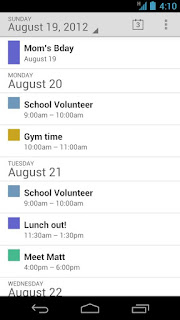
google calendar app


However, there are equally some weakness for various Android phone owners. Because you must at least on Android 4.0.3 Ice Cream Sandwich running on your device, so that the Google Calendar app can works. There are also a whole range of problems on HTC smartphones. Here are different views will not function correctly. Well I recently got myself with the Samsung Galaxy S3

When I look at the range of error on HTC devices, then you can the app to its owner not recommend in good conscience. There is a risk that you may lose notes, photos and not locally synchronized dates completely. With such blunders should better first HTC owners continue to use their old calendar.

Calendar of all accounts, including the Shared

Anyone else can receive all appointments from your Google accounts. Right after installation on my Galasy S3 were all appointments, including the shared calendar, and were present in a clear week and good scheduled. Consider which calendars you want to be, of course, individually.

Quickly add new appointments

Also adding appointments in calendar is really easy. If you tap on a specific period in the calendar, a small blue plus will appear and after you tapping again in the mask for the new date you can add your appointment. In here you will find more detailed features suc as the Tatum, time, any repetitions, reminders, notes, and other details.

The following permissions that asked on Android app:


  • Your accounts
    Manage the accounts list, use the authentication credentials of an account, Gmail
  • Network Communications
    Full Internet access
  • Your personal data
    Read contact data, calendar appointments, and read sensitive information, add, change Unbeknownst to the owner calendar events and send email to guests
  • System tools
    Rest of the tablet disable disable the phone is idle, sync settings, Subscribed feeds erstellenAlle Show Hide
  • Your accounts
    Known accounts, show Configured Accounts, read Google service configuration
  • Hardware controls
    Control vibrator
  • System tools
    Read sync settings, read sync statistics, read subscribed feed

Download Google Calendar

Download Via PC
you also can save it into apk file. read how to save apk from google play.

Google Calendar Preview

google Calendar preview download google calendar

Consumed Data Volume Telecom Flats Charge And Query

Is actually someone here use T-Mobile? If so, you'll probably know the following problem: At some point in the month you reach an SMS in the telecom and reports that your monthly data volume is used up. Mostly this message is frighteningly early and unexpectedly. Therefore, it can not hurt, the data volume on a regular basis to keep in mind. Since the early 2012's thanks to the speed on option finally possible without major problems.

consumed data volume

To query the data volume in your T-Mobile data charge you can do by visit the site http://pass.telekom.de . There, the actual consumed volume is displayed directly in MegaBytes and your monthly limit. The whole thing is also thanks to an independent update that always can quite reliable. You can access the page by those way so many times as you want, since the traffic is not generated here is purely in your data plan. So worth it then also you can bookmark it for regular visits.

Speed ​​On The site also offers yet another added value if you are in the Call & Surf Mobile and Complete mobile data charge. If you have in a month, the flat rate to very strained, you can from here, the data volume of € 4.95 be reset to zero - and it works even several times a month.

In the current state of my flat, it will last until the first data reset not be long. Have you been acquainted with the speed option on made?

Download Tweet Deck For Android

The Twitter app TweetDeck has finally grown because now available for android. In addition to the popular iOS app developers have in fact now an Android app in the race - this is still not officially known as Alpha.
download tweet deck for android

TweetDeck for Android, it is not yet officially in Google Play but can only be downloaded via a direct link. This completes the installation goes smoothly, do not forget to set the hook in the settings under security at "Unknown sources".

Tweet Deck Review

Then off you go, it may also directly: presents a short log, the app is in black style - with a lighter skin with onboard. Home of the index may be the mentions, messages, lists and their own profile easily be navigated via wiping gesture. Otherwise help push notifications to always be up-to-date with Android 4.1 Jelly Bean is under even supports the new presentation of the alerts.

TweetDeck for Android runs despite it still in alpha version we can say the app is very stable. If you have multiple Twitter accounts call your own, We need to be a little slow down the euphoria because although the option to add additional accounts is indeed already visible in the app, but can not be selected. Also can be in the current version does not represent all the entertainment thread.


Download Tweet Deck For Android


If you do not interfere with these small limitations and send her the Twitter app even want to try, you can look here TweetDeck for Android download free.

Download tweetdeck for android here

Motorola Release Android 4.0.4 Update To Xoom 2

The Android tablet Xoom 2 Media Edition of Motorola in Germany has received the update to Android 4.0.4 aka Ice Cream Sandwich. It is distributed both to the wireless-only version as well as for the UMTS model.

Motorola in Germany after a long wait on the update offers Android 4.0.4 update for the Xoom 2 Media Edition. The update to Ice Cream Sandwich is distributed wirelessly. This may still take a few days until it arrives at all customers in this country. the update is available for both the plain-Fi model and for the MZ607 Tablet with integrated cellular modem (MZ608). Motorola had promised for the third quarter of 2012, but the update for German customers no longer offered in September 2012.
motorola xoom 2 android 4.0.4 update

Motorola had recently announced that the Android smartphone Atrix since the beginning of the promised Ice Cream Sandwich update but do not get . Also, an update to Android 4.1 Jelly Bean is known Atrix owner not officially received, the unit will remain in Android 2.3.6 Gingerbread.

Only in September 2012 did the first Motorola Razr Smartphone, get the update to Android 4.0.x aka Ice Cream Sandwich. It has been postponed several times by Motorola and was originally released at the beginning of the year, or about eight months earlier. An official update distribution for the Razr Maxx has not started yet, only test users have received so far.

Jelly Bean plans from Motorola

Motorola will upgrade to Android 4.1 aka Jelly Bean for all internal Android smartphones that are release in 2011 or later come to the market. If Motorola does not keep this promise, customers will receive $ 100 in compensation. This is true but only if they buy a new Motorola smartphone and send the old one. So far, Motorola has just announced for the Razr I upgrade to Android 4.1, which will be released this month.

How To Install Custom Rom On Wildfire S

This is my last tutorial article that discusses about HTC Wildfire S. In this tutorial, will be explained more how to install the Custom ROM. In two discussions on Wildfire S (WFS) before, namely about how to Unlock Bootloader and Root WFS. Now is the time on how to optimize this Smartphone. So Internal Storage can much relieved, and UI look more awesome.

There are some Custom ROM recommended by some of Developer. Among Cynogenmod and Jikantaru XE ROM. But I will not explain all the ROM but only Jikantaru ROM XE. You can consider from the cool side of the UI as well as some optimization features. Okay before I guided step by step, it may be helps if i show results of Installing Custom ROMs Jikantaru XE ROM first.

jikantaru for htc wildfirejikantaru rom for wildfirejikantaru rom download

In this tutorial I assume that all of you has already made ​​the two previous stages, the Unlock Bootloader and Root HTC Wildfire S. So, no need to prepare a lot of things anymore. you just need Only required file JikantaruROM XE Custom ROM.

READ FIRST

  • To do this tutorial you must have root your phone, read how to root htc wildfire s
  • You must have Unlock the Bootloader
  • It should be noted before installing custom ROM, it will be better make nandroid backup ( bakcup the ROM Default first.) Just in case if you want to revert to the original ROM.
  • Okay, time to start the ROM installation phase.

DOWNLOAD JIKANTARU : Download here

Tutorial Install Jikantaru Rom On Wildfire S

  1. Keep in mind, in order to install this Custom ROM, requires a memory partition. There are many ways you can do. Most use "Mini Tool Partition." But I think it is less effective and according to some sources sometimes partitions using this tool can be lost so that the application installed on the SD card can be error. In these applications base on Windows, whereas Android is Linux. So in my opinion is safer to use CWM Recovery that also base on Linux, partitions is more easily, quickly, and accurately. If you want to use SD or memory capacity, choose a good quality.
  2. How to make partition: first go into HBOOT by
    turn off your phone, remove the battery and reinsert it. Press the Volume Down button followed by Power (Volume Down + Power).
  3. Once logged in HBOOT. Pick parts that go into CWM Recovery Recovery.
  4. Once inside the CWM Recovery. Choose Wipe Data / factory reset.
    install jikantaru on wildfire
  5. After completion select Wipe cache partition.
  6. Select the Advanced tab.
  7. In this section, select Wipe Dalvik, then Format SD card. Format SD card to make it really clean so could be perfect partition. Partitioning can be done in many ways. It is up to use which method.
    cwm install jikantaru
  8. After the SD card Format process completed, its partition time. Since I use 2 GB SD capacity. Then I will make partition into two (2). The first partition to EXT2 format applications, the second partition for storage, let the rest for cache memory.
  9. Choose Partition SD Card, then I fill the first 500MB partition, then select o.
  10. After partitioning is completed next install the downloaded ROM. Copy the ROM by going to mounts and storage. after the drive appear, copy the ROM file into the partition that you have made. then Unmount back.
  11. The last step select Install zip from SDCARD. Select the copied ROM file and wait.
  12. Once the process is complete, do the boot. Congratulations you have successfully installed a custom ROM.

Ok, that for tutorial today on How install Custom rom on HTC Wildfire s, which is this time use jikantaru ROM. i hope it helps you. please comment if you want to ask me.

Android 4.1.2 Update for Galaxy Nexus and Nexus S

Google recently has distributed an android 4.1.2 update. This update is for Galaxy Nexus and Nexus S Smartphone in Germany. The update feature and improvements brings with it not all of the innovations that has received on Android tablet Nexus 7th.

Google in Germany distributes the update to Android 4.1.2 aka Jelly Bean wirelessly or By OTA for the Galaxy Nexus and Nexus S. The update is distributed wirelessly in several waves. Thus, it may take a few days until the update has arrived for all owners of the two Android smartphones. A week ago, Google had Android 4.1.2 for the Nexus 7 released, but so far all Nexus-7-owners in Germany have not received the update.

android 4.1.2 update for galaxy nexus

With this update to Android 4.1.2 The behavioral change when several status messages are summarized in the notification area. So far, the collected status messages have been opened with a zoom gesture, now this is possible with a mop in this area. This allows accumulated status messages conveniently open-handed. Otherwise, this update corrects a bug and will generally speed up the system. In addition, some of the menu structures were changed. The user can now prevent a global switch requests the location of all apps. In addition to long SMS no longer be erroneously converted into an MMS.

No landscape mode for home screen on smartphones

Neither the Galaxy Nexus still OR the Nexus S, there is introduced with the Nexus-7-Update Landscape view of the home screen. On the two smartphones, the start screen can therefore continue to be used only in portrait mode. It is unclear why the landscape rendering in Android 4.1.2 implements apparently exclusively for tablets.


Occasionally, problems with Google's Play Store

After the update, some users report a problems when updating Android apps on Google Play Store. The updating of applications fails. Basic problems are mentioned as when accessing a server. In this case, it should help to clear the relevant Google account on the device and then log back in to that account. In the alternate version of Android from Android 4.1.2 CyanogenMod team has been integrated a week ago. Since the functions of the current Android version in the nightly builds are of CyanogenMod 10 (CM10) included. you can read cyanogemod 10 m2 release

Galaxy Note New Features On Android 4.1

During the Android 4.1 update for the Samsung Galaxy S III is distributed in Poland and in Korea, the rest of the world is still waiting for the android 4.1 udpate for Galaxy Note. Starting today is Sweden's turn for s3 update. But with the Samsung Galaxy note the update for android 4.1 seems to be rather slow
You can read my previously post about galaxy note android 4.1 update news


the Vietnamese forum Tinhte.vn now get the update to Android 4.1 for the Samsung Galaxy Note. Sure, there might be a (good) fake, but is Tinhte.vn in the past very often noticed the leaks of unreleased devices. and many of the leaks is really proven and become true. In this respect should agree the information and the Samsung Galaxy Note GT-N7000 gets shipped with many new features:

Galaxy Note Android 4.1 new Features

  • The system is clearly superfluous, one is almost on a level with the Samsung Galaxy II
  • Large parts of the UX Nature of Galaxy S III and grade II to find their way on the Galaxy Note
  • Many functions that were first shown at the Galaxy S III coming to the Galaxy Note: Stay Smart, Direct Call, Smart Alert ...
  • The photo gallery of the Galaxy Note II comes on the first Galaxy Note
  • Many additional features of the S-Pen
  • There are also supplied directly screenshots and details of the alleged JellyBean updates to the Galaxy Note. (Click to enlarge)


Galaxy Note New Lockscreen


GalaxyNote android 4.1 lockscreen

Although it greatly surprised that Samsung even supposed to bring the Galaxy Note II Background to the first Galaxy Note, the lockscreen is greatly expanded. The most interesting thing here: Popup note will also enable the lockscreen with writing notes.

New Homescreen

GalaxyNote JB Homescreen

Also, the Galaxy Note will get Android 4.1 later with two home screen modes: Once the "classic" Basic mode and the Easy mode, which is to facilitate the operation.


Galaxy Note Appdrawer

GalaxyNote JB appdrawer
Application Drawer 3 showing the same as the SIII & Note II: the grid to sort by the users themselves, in a grid in alphabetical order, and the list in alphabetical order. Shortcut of the application can be hidden but not removed completely. Also menu allows quick access to the Play Store to find support.


Notification bar and Smartstay

GalaxyNote JB Notification SmartStay

  • Notification Bar is also similar update on the SIII and Note II with a variety of settings can be turned off directly in the Notification bar. Notifications in the Notification bar is also flexible and interactive than ICS.
  • Smart Stay (Tracking the user's eye to hold the screen does not turn off when the user is looking at the screen). This function is can be set in the menu Settings -> Display. In this menu can also enable the automatic changing screen colors match the image display to save battery


Movement control and blocking mode

GalaxyNote JB Motion

The motion detection function (Motion):
Direct Call function (call directly when putting up the ear while looking at your contacts, messages, etc.), Smart Alert (Notify missed events just hold the camera up), Double tap to top (double tap to the top of the machine to move to the top of the list), Palm touch to mute / pause (laid hand on the screen to mute, pause the movie) ... was added. These functions are installed in the menu Settings-> Motion


call options, volume, and Internet telephony

GalaxyNote JB Internettelefonie


Pop-play and browser popup

GalaxyNote JB PopUp Browser
Firstly, the video player is floating in the known pop-play in size to the other and in my opinion even more interesting, it seems to be a pop-up browser. Open the browser in a second small window seems permanently to have extremely interesting.


The new Gallery of the Samsung Galaxy Note II

GalaxyNote JB Galery

Tizen and HTML5 based, faster and fancier - and actually the Galaxy Note II reserved. Super!


S Note Feature on Galaxy Note

GalaxyNote JB SNote

  • S Memo was officially put into the museum. Still on the screen as you click the icon, just get message "This application has all its life cycle and to introduce alternative application is S Note".
  • S Note has been upgraded quite a lot. Now you can record the pen strokes for later playback as animation.
  • Allows applications to insert symbols, clip art comes to makes notes easier and more efficient.
  • Function: In this upgrade, just put pen to close the screen with the pen icon appears on the screen immediately. Previously this effect turned off in S-pen setting but now the default is always on.
  • It will also be possible to record his drawing as a video.


CONCLUSION: For a Fake this full story is too complicated and too good. In the right places to find the information provider. Unfortunately, the source changed the name of the software and the ROM is not yet available for download, you will have to be patient. But it is absolutely amazing how the Samsung Galaxy Note and updated here to update brings - more than many would have ever expected.

CyanogenMod released CM 10 M2 Stable

This month the monthly stable update cyanogenmod 10 m2 has released. Exactly one month ago, the CyanogenMod team has announced the new Cyanogenmod 10 M release. This should summarize the monthly progress of the experimental nightly builds and put together in a stable corset. CyanogenMod 10 M2 has been released in time for a large device selection.

The second edition of the monthly stable nightly builds of CyanogenMod 10 is out now and already includes a number of different smartphone models. This is the CM 10 M2 to the current interim progress report on the nightly versions of the custom ROM. This version is much more stable than the nightly compiled CyanogenMod 10 variants and should be suitable even for everyday use.

cyanogenmod release cm10 m2

The CyanogenMod 10 M2 has been released for the following Android devices:

cyanogenmod 10 M2 list supported devices

  • GALAXY Nexus GSM (maguro), GALAXY Nexus VZW (toro), GALAXY Nexus Sprint (plus toro)
  • GALAXY S2 GT-I9100G (i9100g), GALAXY S2 AT & T LTE (skyrocket), GALAXY S2 T-Mobile (hercules)
  • GALAXY S (galaxysmtd), GALAXY SB (galaxysbmtd), Captivate (captivatemtd)
  • Sprint Galaxy S3 (d2spr), VZW Galaxy S3 (d2vzw), AT & T Galaxy S3 (d2att), GALAXY S 3 TMO (d2tmo), GALAXY S3 U.S. Cellular (d2usc)
  • Motorola Xoom (wingray / stingray)
  • Nexus S (crespo), Nexus S 4G (crespo4g)
  • GALAXY Note AT & T (quincyatt), GALAXY Note T-Mobile (quincytmo)
  • Google Nexus 7 (grouper)
  • LG Nitro HD (P930)
  • LG Optimus Black (P970) LG Optimus LTE SKT (su640)
  • Sony Xperia Acro S (hikari), Sony Xperia S (nozomi)

UPDATE
If you have Galaxy S2 you can see tutorial how to install this custom rom. see how to install cm 10 on galaxy s2

Interesting thing about this list is that both the Samsung Galaxy S2 GT-I9100, the Samsung Galaxy Note, and the international version of the Samsung Galaxy S3 missing. Although the GT-I9100g and the Galaxy Note and SGS3 variants of different U.S. providers are supported, however, these also no Exynos CPU but those use chipsets from Texas Instruments and Qualcomm.

Whoever wants to flash a "stable" version of CyanogenMod 10 based on Android 4.1 on their smartphone, which can of course download the file directly from the developer and install it. But as always, please apply only experienced Android users, all others should better keep your hands off. As always, I take no guarantee!

Download Cyanogemod 10 M2 paste this url to your browser http://adf.ly/Dg5jv