Pages

Pages

List Of Android 4.2 New Features On Jelly Bean

Maybe many of you still do not know what is all the new features on Android 4.2 , and a lot of people have been search on google and maybe still don't find any clue about the awesome new features. So on This post we will give you the list of new features on Android 4.2 Jelly Bean which we het from some research.

In addition to the triumvirate of Nexus devices release , which Google has just release just before closing time in the world, there are also software-page news to report. We put together what is to learn about Android 4.2 so far.

New Features On Android 4.2

Until now, it seemed that the star of "Nexus smartphone" is the hardware. That's not entirely wrong, because Google does with its hardware partners quite a legion of top devices for fantastic prices to the people. Besides that is also offers Android 4.2 which is still under the name of jelly bean sweets. There are a lot of fancy new features that go far beyond what we have previously expected, and brings this feature set course for older Nexus devices.

Here a preliminary compilation of  introduces From Google about Android 4.2 New Features


Camera

photosphere feature on android 4.2
The camera app now dominates Photo Spheres - photos, as they are captured while photographing you can swing in any direction. The end result is freely rotatable and zoomable 360 ​​degree panoramas. Integrated for Google Street View Photo Spheres technology and has set up a special page on the one example panoramas in the world can see and add your own panoramas.
Furthermore, the new interface has been revised total. All settings can now be achieved by pressing and holding a ring menu in the viewfinder.


Keyboard
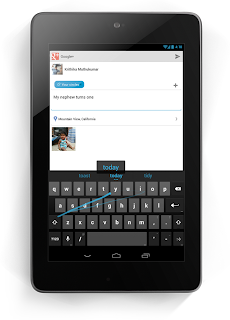
new keyboard on android 4.2
The Android keyboard now supports also a wipe-input mode, similar to Swype. Here, as in the recently introduced SwiftKey flow , but just above the fingers, the word appears that identifies the software at this moment.


Tablet layout

android 4-2 tablet layout

Google creates from this since been Honeycomb tablet layout. Looks to future Android tablets and smartphones almost identical. This means that the software buttons are placed below the middle, the button for the App Drawer wanders down the notification bar at the top. For more information you learn in our article on the subject this morning.


Lockscreen

From then on you can just start the camera with a wiping gesture right from the lockscreen. Wipes are left, you can see there previously placed widgets. To launch the appropriate app, they prefer the unlock pattern from the bottom up. Also on the actual lockscreen widget can be displayed on the choice.
You can se our lockscreen collection on download android lockscreen.


Multiuser operating

Finally, several users can use a tablet each with their own account, each user dials in with their Google Account and then has access to all your apps with separate settings, continue their own homescreen widgets and so on. A change between individual users can be done on the fly, a reboot is not necessary. The feature is not available for smartphones - will be but certainly easy to retrofit by custom ROM or the like on mobile phones.

Google Now

Google's self-learning push information service will be able to display some interesting photos from the current radius, track packages and flight information for which you have received a notification e-mail, and view the program of cinemas nearby leave. Here is still questionable whether the new features work from the start even in Germany.

Wireless Display

Android devices can now flip screen and sound natively via Wireless Display on a big screen TV or any other device with HDMI input. Therefore a wireless display to HDMI dongle is required.


Google Play Music

Google's online music store and shop finally comes to other countries, including to Germany. A new feature is a function that matches the own local music library with the offer from Google. If an individual song is also available on Google, it must not be uploaded separately, but will not upload easily transferred into their own online library.


Quick Settings

Android now includes a quick-setting screen for comfortable enabling and disabling Wi-Fi, Bluetooth, etc. This can be achieved either through a special button in the notification bar, or by two-finger gesture of wiping down the notification bar.

What are your favorite features of Android 4.2? We welcome your comments.

HTC One X + appears in the prospects of O2 UK

A few weeks ago there have been rumors about an HTC One X +. This smartphone is the succesor of One x. this smartphone also will be an improved HTC One X. And we also can find technical data already appeared on the net. But now there is the first concrete evidence of the HTC One X +. but now the new smartphone from the Taiwanese manufacturer first shown in a brochure of the UK network operator O2.

HTC ONE X+ Leak from O2

htc one x+ release date

If the clipping is true, the device will only improve in some area of ​​its predecessor. Firstly, the internal memory increased to 64 gigabytes and also the quad-core processor gets a little more power and is equipped with 1.7 GHz. Otherwise, the device includes the usual camera with 8 megapixels and the customer gets the usual 25 GB Dropbox storage. Interestingly, the HTC One X + already comes with Android 4.1 Jelly Bean on the market. Consequently, it is likely that the HTC One X receives the update to the new Android version in the course of the sales launch.

Overall, the new version of HTC One X only a small added value to. And especially for the price equivalent to EUR 600.00 then the smartphone with o2 in the UK is for me one track can be too expensive. Although the literature has been "coming soon", but I assume that the HTC One X + will be released in October.

Extensions Image 9.png Android

If you are an android app developer, is certainly no stranger to the image file with the extension .9.Png. Sometimes some android applications using image files with the extension .9.Png's. In this article I want to share with you about the image with the extension .9. Png.
Before going any further on the image with the extension .9. Png, we first discuss the meaning of .9.Png and unit of measure in the .9.Png.


What is .png file ?

PNG (Portable Network Graphics) image format one image using compaction methods do not eliminate the part of the image. Generally used for PNG images in web images. PNG image format has better compression factor than the GIF (5% -25% better than GIF format).

PNG files can work well on images with vivid color separation and graded. PNG files are divided into PNG-8 and PNG-24. For PNG-8 can compress the image with a smaller file size than GIF. While the PNG-24 save the file with a larger size. PNG-24 is commonly used for photographic images or graded, since the resulting image will be sharper. Another plus, PNG supports transparency as in the picture. GIFs.

For the Web, PNG format has three advantages over the GIF format: Channel Alpha (transparency). Gamma (setting the brightness image of en: "brightness"). Impressions image progressively (progressive display) For the purposes of image processing, though the PNG format can be used as an alternative during image processing but the JPEG format is still a better option. (Source: potter )


Wha Is .9. Png File ?

Is a file which is a derivative of. PNG in a single PNG file in use for several sizes. Or simply dynamic image size. Where size is determined from the pacth that is given in the file. Its use is intended to conserve file size. So the use of a static image into a minimum to reduce the file size of the application.

Problems with the .9. Png

  • Android devices come in many shapes and sizes, often making it very difficult for developers to design applications that look great on all screen sizes and a variety of orientations. To address this challenge, the graph can Nine Patch indispensable. In this article, we discuss what Nine Patch graphical format, how it works, and when to use them.
  • Sometimes when we edit the apk or create android application, we have a problem in the process of the application compile, because we forgot to use the image files with the extension .9.Png , therefore, in this article I want to share you about image editing with the extension .9 . png


What is Nine Patch ?
Graphics Nine Patch Android support for image scaling control. Graphic Nine Patch only PNG graphics that have patches, or areas of an image, defined to scale and stretch in the right areas, not the scale of the overall picture as a unit, which often obscures the graphic details. Generally, transparent or solid patch center, with the edge to remain fixed, the other edges are set to stretch, and the corners to remain fixed.

Illustration picture below will explain how an image (in this case, a square) is divided into nine patches.
extension image 9.png on android

When Do We Use Graphics NinePatch?

Graphics that can be stretched to be used anywhere in your application where size chart may vary, particularly useful for:

  • background Button (where text strings of various sizes)
  • Frames (where the picture of the inside should come in various sizes and aspect ratios)
  • Every time you use drawn with at least one dimension is set to wrap_conten


How To Edit Graphic Nine Patch (edit graphics on the apk)
To edit a graphic Nine Patch PNG graphic files using Draw 9-patch tool, perform the following steps draw nine patch tutorial:
  1. Open the / decompile apk file you want to edit by using the way you can find the article that i have make yesterday read how to edit apk file .
  2. Open the folder res / drawable (ldpi, mdpi, hdpi or another folder that contains the graphic)
  3. Edit the images you want to edit them using graphics editor like Adobe Photoshop or other graphics applications though.
  4. Once you are done editing, save the images in the format. Png
  5. Open the application "9-patch.bat" located in the Android SDK / directory "tools". (References: android development )
    image extension 9.png
    -Drag PNG file into the left pane (or use File-> Open NinePatch)
    how to use draw9patchstart
  6. Click the "Show Patch" checkbox at the bottom left.
    tutorial draw9patchstart
  7. Set your patch right scale (higher to see the results more clearly).
    To set the horizontal patch guide, click along the right edge of your graphic.
    To set the vertical patch guide, click along the top edge of your graphic.
  8. If you need to remove your patch, press Shift and click on your pixel (black).
  9. Keep your graphics with the extension .9. Png (for example, maxiandroid.9.png).


If you want to create a graphic file with the extension .9. Png you can find more detailed tutorial tutorial draw nine patch and here

How to Customize Android Lock Screen Display

Are you bored with the look of your android lockscreen and want to customize it? Or maybe you want to be creative with makes your own lockscreen? How do I make it? let me share a common custom lockscreen on android.
Before discussing more about how to modify android lockscreen. first prepare the steps and materials that will be used in the custom lockscreen.

Requirements

How to change android lockscreen

In this article, I divide tutorial change android lock screen into two section, basic and advanced, with basic method has no risk to you, but if you fail to edit in advance method can cause bootloop when you fail.

Custom Android Lock screen with basic method

  1. Choose one of the lock screen that you want to edit
  2. Download apk lockscreen
  3. After you get the get apk, decompile the apk using maxiedit
  4. Find the graphic files, and edit using imaging applications (common graphic files are in the folder "drawable")
  5. Re Compile the file to be apk file again. then install the apk
  6. Finish and you can enjoy your new lockscreen.


Custom Lock screen with Advance method

  1. Backup framework res.apk then move it on your PC
  2. Edit and decompile framework-res.apk by using MaxiEdit
  3. Open the folder results decompile framework-res.apk, then find the xml file keyguard_screen_tab_unlock
  4. Edit the xml file with notepad + + (already available on MaxiEdit)
  5. Find a line that is writing like below:
    <RelativeLayout android:gravity="center_horizontal" android:id="@id/root" android:background="#70000000" android:layout_width="fill_parent" android:layout_height="fill_parent"
  6. Then change to
    <RelativeLayout android:gravity="center_horizontal" android:id="@id/root" android:background="@drawable/lockscreen_default" android:layout_width="fill_parent" android:layout_height="fill_parent"
  7. Then save
  8. Then create a custom png image, adjust the resolution size of your android device (example, 240 x 300 pixel for QVGA), created according to your creations, and then rewrite to lockscreen_default.png
  9. After done, input the lockscreen_default.png image to the the res-drawable folder / (ldpi-mdpi-hdpi)
  10. Edit also another image file that you want to change
  11. Delete the resources.arsc file
  12. Go into the folder res-layout, remove the file keyguard_screen_tab_unlock.xml
  13. Then compile the framework-apk file and make sure there are no errors when compiling
  14. Perform nandroid backup before you push the framework-res.apk that you have created just in case you failed to edit because it will cause bootloop
  15. Push the framework-res.apk that you compiled earlier to the system / framework
  16. When finished push the framework-res.apk , then reboot your android device
  17. If you are succesfull, then the lockscreen you will become as your creation

Note:

- Both the basic and advance way, note DO NOT CHANGE the size of the image resolution, and image extensions (if .Png then your new file extension must be .Png, if .9.Png then your new file must be .9.Png too. To make .9.png you can read the article that I have provided above by using a 9-patch)
- Make a backup before you edit using advanced ways

Ok thats for how change and customize your android lock screen. see you in next android latest news

How to Fix Camera Problem On Sony Xperia Play

For users of the Xperia Play device, there is a bug for the Xperia Play Camera. Well in this post I'll Post Modification on Xperia Play Camera that has been done By one Xda-developers forum member the camera bug. this mod will help you to fix camera on Xperia Play.

Camera Mod for Sony Xperia Play

Then what is the functions of this Xperia Play camera Mod? This mod has been changed to Applications by author, the function is to activate the R button as the shutter button for taking photos and recording video. not only that, but this xperia camera mod will also enable the L button to act as focus in photo mode.

xperia camera mod download

For you who need this application on your Xperia Play, now the developer has been enrolled it in the Android Market, as the Camera Mod for Xperia PLAY. to download is very ease. you can download direct from google play. or if you want to save it in apk file, read how to download apk from android market

Installation Camera Mod For Xperia Play

  1. First you need to Backup your original camera application on your device, for example, use Titanium Backup (on condition you have root acces, see how to root xperia phone)
  2. Delete the original Camera Application
  3. Reboot your Xperia phone
  4. Install Applications
  5. Done


Easy enough right? now to make your Xperia Play camera more elegant you can use it, hopefully this article useful, if you want to ask something, please ask in the comment box below.

Galaxy S3 Android Jelly Bean Source Code Released

Samsung has released the kernel source code for the Jelly Bean update on the Samsung Galaxy S3. Thus, developers of custom ROMs have the ability to offer better alternative firmwares.

we know that the android operating system is based on open source OS, so it can be free owned or developed. so Samsung issued to the public the jelly bean source code that exist in galaxy s3. When a new device or a major software update for existing devices market will publish Korea usually within a few days, the source code. This was the case of android 4.1 on the Samsung Galaxy S3 . After the rollout of the firmware update has been launched in the first countries to be found on the open source portal, Samsung has now also archive these sources and binaries device driver / OS combination, and allows interested parties to look at the software, so it is very usefull for developers who want to make the jelly bean more customized.
samsung galaxy s3 jelly bean open source code

Galaxy S3 Jelly bean Source Code

And what about the practical impact that if the source code is published to public? Thanks to this package, the developers of custom ROMs such as CyanogenMod the opportunity to present their alternative firmwares better adapt to the device hardware. There were, for example, may have made already CyanogenMod 10 on Samsung's flagship, it was only using various workarounds. Thanks to the devs of the source code can customize the CM builds better now, fix bugs and improve performance.

We expect that the next nightly builds of CyanogenMod 10 new features clearly benefit from Samsung's open source package. To stay informed about what happened CM10 should take a look at the current Changelog throw.

Are you happy that Samsung has released the source code for JB or you are not interested in custom ROMs? give me your opinion on comment area

Jelly Bean source for the Samsung Galaxy S3
(Under Mobile -> after Mobile Phone GT-I9300_JB_Opensource_Update5.zip

Samsung Galaxy S2 Android 4.0.4 Update Release

Finally, today there is good news for the Samsung Galaxy S2 users. Today This samsung smartphone has officially release an update to android 4.0.4. This update is available by two ways via OTA(how to perform ota update) and by update samsung phone via Kies. This Samsung galaxy s2 android 4.0.4 update Size is around 67.09 MB. So just use which one way you like to update your smartphone

However, this Android 4.0.4 update is available only for "free" Samsung GALAXY S2 and NOT for the ominous G model. And as usual the changelog for the update as always it is not explained by samsung. However, users report that after installing Android 4.0 on the Galaxy S2 the wireless connection is stable again.

Who the users that still didn't get offer for update android 4.0.4 from samsung don't need to worry or nervous. because as usual this update for samsung smartphone is released in some waves/stages so just be patient until the update come to your country. Of course you can occasionally look at the settings of the Samsung Galaxy S2 and Android 4.0 .4 initiate manual update.

SAMSUNG GALAXY S2 GET ANDROID 4.0.4

galaxy s2 android 4.0.4 update


The Android 4.0.4 update for the Samsung Galaxy S2 will be the last Android Ice Cream Sandwich update for this smartphone. Because even for November Samsung has announced the Android 4.1 update for this Android phone.
UPDATE
there are some issues that appear after this update. read galaxy s2 android 4.0.4 problem

Samsung Galaxy S3 Android 4.1 Update Begins

Finally, the awaited update from samsung has been officially released. after a lot of speculation that appears when will the android 4.1 update for galaxy s3 release, finally the questions now is answered. Samsung has start the android 4.1 update. And just like any other update, the process is divided in waves.
for the current update has reached the most eastern European countries such as Croatia, Macedonia and Poland. Samsung Galaxy S3 Android 4.1 Update size is around 282.5 MB and the firmware version is called I9300XXDLIB. And this update is comes via OTA from your smartphone.

The I9300 XXDLIB android jelly bean update for your great Galaxy S3 Android smartphone comes via OTA (What is OTA) to your device. Perhaps here the download via Wi-Fi is useful in order to preserve the data flat. About changes to the Android 4.1 Update for the Samsung GALAXY S3 maybe you was already know if you have test the leak of firmware that have been often rollout such as XXDLI7. everyone could already make a picture to proof about Android 4.1 on the Samsung Galaxy S3. here is the picture

SAMSUNG GALAXY S3 I9300XXDLIB ANDROID 4.1 UPDATE

SAMSUNG GALAXY S3 I9300XXDLIB ANDROID 4.1 UPDATE

So, now we just wait until the Android 4.1 update comes to your country. Here is assumed that there can be no more than a few days will come to global. The update is probably really no later than early October, so maybe next week you will have android 4.1 on your galaxy s3. thats it for the latest news firmware update about galaxy s3 android 4.1 release.
Stay update with this blog to get update for all about android smartphone, firmware and tutorial. you can subscribe if you want. see you

Why Samsung Interested Developed Tizen OS

You probably have never heard about Tizen, and also you still do not know what is Tizen. Tizen is an open source mobile operating system and it is free. Tizen is based on Linux operating system and displayed to the world public by the Tizen association. you can read complete explanation about tizen from wikipedia. Tizen is predicted to be a great mobile operating system that might be able to compete with android and ios

And now one of the biggest smartphone vendor Samsung announced that They will launch a prototype device in the first Tizen developers conference in san francisco. Maybe some of you wondered why Samsung could be interested to develop Tizen on their smartphones. And at this time I will be discussing Why samsung interested to use Tizen.
tizen on samsung

Tizen Specification

Tizen have some features in common with its predecessors whizh called MeeGo (MeeGo is no longer being developed) such as good networking management, but there are some important differences
Tizenoperating system is based on web standards such as HTML5 and WAC and other web technologies and it is implemented for use in tablets, netbooks, smartphones

Actaully yesterday samsung has confirmed that they have tested it on one of their flagship phone. you can read on Samsung Test tizen on galaxy s3.
One of the Samsung officials said that Samsung this year will port bada to Tizen. "We have a business that would combine Bada and Tizen," he said Forbes. He said the merger was already underway, although he did not set a date for completion.
Surely all of you thingking, Sasmung already have Android and windows on their smartphones. So why do they still need Tizen?

More control, More power

The answer is Samsung will have full control. With Samsung release the Tizen OS on their handsets without Google (and Motorola), it can make samsung device more distinctive than the another android gandsets that spread on world sale, such as Apple which use IOS as their "own" OS.

Samsung was interested to improve their software touches, such as your device knows when you are looking at it, and your device keep the screen on until your eyes not look on the screen. And the ability to make a call to someone by just raising the phone to your ear. And Samsung knows if most of Android devices are can pretty customized, so if samsung wants to keep the position as the top in the smartphone market, they needs to create a new innovate. So tizen might be the one who can make it realize.

Samsung is planning that they will at least make one or two devie powered with Tizen this year, said by Tae-Jin Kang. While he told Forbes "Tizen will not become Samsung's main operating system platforms in the near future," but the fact he mentioned to the others that it would be samsung flagship. Is Samsung can build their own OS to gradually overtake Android version in the next few years? quite possible.

And as the proof in past June 2012 Samsung had unveiled a prototype devie powered by Tizen. It has specification with a 4.3-inch screen, a dual-core 1.2GHz processor, so if the prototype can be developped perfectky the tizen os can turn from power mid-to high-end handsets, just as Tae-Jin Kang said.

The protoype of Tizen OS looks kinda similar to TouchWiz. And the HTML5 apps look a little laggy when run, But don't worry this is still just a prototype. this prototype also have Support for Facebook, Twitter and Gmail.

Samsung also said implemented Bada apps in future software, so you’ll still can to use your Bada favourites on samsung Tizen mobiles. So this will also be a good news for developers, if they have know how to make apps for bada the will able to make apps for tizen too without need any new skill required. So There will be many apps on Tizen device.

Samsung Tested Tizen On Galaxy S3

From the latest news confirmed that Tizen is tested on Samsung(Galaxy S3), Intel and a some of other manufacturers are currently developing an operating system for smartphones and tablets, relying entirely on open source. By focusing on HTML5, the system is reasonably future-proof and therefore many are eagerly awaiting a first device with Tizen on board.

Tizen is an full free and open source mobile operating system and Tizen also will support with HTML5. So this is expected to provide more secure prospects in the future. And some manufacturers for smartphone such as Samsung Intel and other major manufacturers focus on this mobile operating system for smartphones and tablets. Perhaps the Tizen Operatyng system will be the new powerfull rival for android, ios, and windows phone?

Samsung has apparently in such a test:

Tizen On Galaxy S3

tizen on galaxy s3

Samsung got the Wi-Fi certification for Samsung I9300 Galaxy S 3with Tizen. Normally if a device get such a certifications relatively there will be soon to a publication. However, Samsung has pushed the first devices with Tizen to next year. So what can you going to do with the Galaxy S3 with Tizen only speculate: Either a test of Tizen on reasonable hardware or an upcoming Galaxy S 3 with Tizen on board. Then Samsung would actually (almost) the same hardware but three operating systems on board in the portfolio (Galaxy S III, ATIV S and the Galaxy S 3with Tizen) - the user could then choose. Actually a pleasant idea.

Chameleon Launcher Available for Android at Google Play Store

Do you know the what is the best launcher for tablet at now? And want a litle review about it? yes you can find it here. Do you ever heard about Chameleeon launcher? Chameleon launcher is just release for now. and many android user have wait for this launcher to release on the android market. beacuse of this Design, and many new feat[ures.

Now the Chameleon Launcher has really done so. For EUR 7.86 you can get the v1.0 now probably really coolest launcher for an Android tablet. its Only need requirement that your Android tablet must run on 3.2 Honeycomb or higher. From today you can purchase Chameleon Launcher in Google Play store.

Maybe you realize The history of the Chameleon Launcher. Long did it take the process until finally had the necessary capital for development. On Kickstarter there was the longed windfall, even if only at the second attempt. Even in the beta phase of the Chameleon Launcher could really impress.
Chameleon Launcher review

Because with probably the best Launcher for Android Tablet is the Chameleon Launcher, that will become new standards. With chameleon launcher, it is now possible to use time-and location-based profiles, between these, he turns around and is then accordingly the desired functions, example in the morning if you are at home, is only for the messages and private e-mail. And if you are at work then just the business e-mails, etc will you get. So just customize it. if you want to get chameleon launcher review see this video below

Chameleon Launcher Review


Get Chameleon Luncher from googleplay

HTC One X Android 4.1 Update Coming Soon

For many smartphone models, especially from Samsung, the Android 4.1 updates have been announced already. But besides samsung HTC also has been marked the HTC One X to get the android 4.1. Because there is Android 4.1 Leak for HTC One x. But when exactly is the HTC One X Android 4.1 update? That can not be said for sure, but the rumor said that it will come in October or November.

Android 4.1 for the HTC One X probably does not seem to be too long in coming. However, it seems before giving yet another HTC One X smartphone with Android 4.1 HTC will release its successor. Because for this phone it will probably be a slightly improved successor, called the HTC One X +. 

And this smartphone is supposed to come on with Jelly Bean. Then After HTC One x + release will probably the htc one x will get android 4.1 too as I said, in October or November. This is confirmed by HTC is not yet operational. And its clearly if HTC does not want to lose any more ground in the highly competitive smartphone market, with the HTC One X Android 4.1 Update come quickly.

Android 4.1 Update For HTC One X


If then also wether equal Sense 4.5 included with the Android 4.1 Jelly Bean update for the HTC Jelly Bean, is also not yet clear. However, it should be obvious. One can only hope that HTC will not be too long and Android 4.1 will deliver soon. Or the Taiwanese are now put more on Windows Phone 8?

How To Upgrade Samsung Galaxy Ace Via Samsung Kies

For All Samsung Galaxy Ace Users the official latest firmware is Gingerbread 2.3.6. But The galaxy ace are originally sold with Froyo 2.2.1. So it looks like so vain right? A device like galaxy Ace which have Specification that we can say it is powerfull enough, those Froyo is to "ugly". So you must uppdate to The highest firmware version.
Here is a complete tutorial update Galaxy Ace via Samsung Kies. I think Kies 2.x version isn’t the best and The most reliable software around, but if all of you have use Kies 1.x version , you will prefer to be using 2.x.
So maybe you will find a trouble while upgrading, but I have provided fix for that.

Tutorial Update Galaxy Ace Via Samsung Kies

  1. Install The Samsung Kies. You can use the CD that provided with the handset when you buy. But If you do not have the CD Kies, you can download from the Samsung website here = http://adf.ly/D5FR(paste to your browser). To upgrade to the latest version of android You need a latest version of Kies. So If you installed Kies from your CD you must check for any Kies updates. to get the latest.
  2. Note- If you installed Kies after downloading from website then install USB drivers manually by going to Tools->Install Driver in kies.
  3. After the installation process is complete. open Kies then connect your device using USB cable.
  4. After you have connected your phone to your computer, then will appear a notification that shows if there is a new firmware version is available to update and then will ask you to upgrade or not. To update Choose the Update buttonhow tp update galaxy ace via kies
  5. Click the Start upgrade buuton.galaxy ace upgrade via samsung kies
  6. When the update process is begin, the tools will start to download the firmware upgrade components. You may take a backup of your data when asked. Though The upgrade will not cause in losing your data, sms, contacts or Apps. But it will be better to have in case something wrong might happend.how to use samsung kies
  7. Now the download update process is start and will take maybe for around 5 minutes to download the needed files (NOTE : I am on a fast internet connection, it may will take you more time). important Don’t unplug your device while upgrade is in process. After the download process, will appear a box that say “upgrading firmware” then your device will boot into recovery. But somtetimes it has a bad habit of getting stuck at 0%. So if it happends, do this-
    - Disconnect the usb cable (though the dialog explicitly says not to do this)
    - Restart phone.
    - Close kies (or force close if it not responding.)
    - Then Try to reconnect(plug again the usb). If Kies doesn’t detect your phone now, then don’t worry, reinstall kies and usb drivers.samsung kies update tutorial
  8. When the update firmware process is finish, a new window will pop up and says Firmware upgrade complete.
  9. Then Your phone will reboot

CONGRATULATIONS! you have successfully upgrade galaxy ace with latest firmware via kies.
If the download process for you need much time you can update manually you can use this tutorial How to flash galaxy ace via Odin

How to Install Official Cyanogenmod 7.2 On Galaxy Ace

The Official Cyanogenmod 7.2 is finally released for Samsung Galaxy Ace. This final stable version release. Besides For Samsung Galaxy Ace Cyanogenmod team had aslo release Global CM 7.2 for more than 69 devices.
This Custom rom Will make Your Galaxy Ace More powerfull with many new features. And This custom rom is added with some feature of ICS so you can test some of the goods from Ice Cream Sandwich. You can read more detailed Cyanogenmod 7.2 features on that links.
And Now i will give you Tutorial Install Cyanogenmod 7.2 On Galaxy Ace. To Install This Custom Rom you must complete the prerequisites first.

official cm7 for galaxy ace


Before we start you can see the cyanogenmod features on this video below, so you can know well how it is work, then you will curious and want to upgrade galaxy ace to cyanogenmod 7.2


Requirements
  • Back your data. Such as SMS MMS, Your Application. To back up apps you can use Titanium Backup
  • It would be better if you make an nandroid backup, so if you want you can revert to the last your phone state when you make backup. see How to Make nandroid backup.
  • Make sure your current ROM is on 2.3.X if you still on 2.3.x follow this how to flash stock firmware on galaxy ace
  • Must have Root acces. see How to root galaxy ace
  • Must Have install Clockworkmod recovery


Tutorial Install Cyanogenmod On Galaxy Ace

  1. Download CyanogenMod 7.2 (password if need : tutorialfor-android.blogspot.com)
  2. Download Google Apps for galaxy ace
  3. Place the CyanogenMod update.zip file on the root of the SD card.
  4. Then also Place the Google Apps .zip on the root of the SD card also.
  5. Turn off your device,then boot into ClockworkMod Recovery. by Hold Power and Home. after Samsung logo appears, release Power, but keep Home held down until the CWM appears.
  6. After in the Recovery mode, use the side volume buttons to move, and either the power button or trackball to select.
  7. Select to Wipe data/factory reset.
  8. Then select to Wipe cache partition.
  9. Select Install zip from sdcard.
  10. Select Choose zip from sdcard.
  11. Select the CyanogenMod update.zip.
  12. Then Install the Google Apps by do the steps 9-11 again and choose the Google Apps update.zip.
  13. After the installation finished, select Go Back to back to the main menu, Then select the Reboot system 


Congratulations. Now you have successfully install Cyanogenmod on galaxy ace. Let me see your experience after use this cm7, is it very cool? or ask me if need any further assistant on comment area

Cyanogenmod 7.2 Feature On Samsung Galaxy Ace

What Do you know About Cyanogenmod 7.2? Cyanogenmod is a developer team that works to create a great custom rom(What is custom rom?). Their custom rom are very popular today. there are also a lot of cyanogenmod version. in this post i will give you link and you can look the version of cyanogenmod. Actually now the team is work to make stable version for cyanogenmod 10 which is based with jelly bean.
But it is make many android users fell disappointed because cm10 only available for some device and we hope there will more device will available to the cm10. But If you the users of Samsung Galaxy ace you must forget that. Because cyanogenmod team had announced that galaxy ace will not get cm10.
cyanogenmod 7.2 feature

Official Cyanogenmod 7.2 For Galaxy Ace

But all of you don't too think about it. because cyanogenmod had officially released cyanogenmod 7.2 for galaxy ace. On it is Stable version. All things will work smooth. and there are no bugs found(until now). And The CyanogenMod 7.2 Rom Release arrives with some Ice Cream Sandwich looks, a predictive phone dialer, and many more.

CM 7.2 RC is based with the Android 2.3.7 open source code (Gingerbread). This latest release of cm 7.2 is integrates some of the transition effects and good rotation effects that only can be found in ice cream sandwich. CM 7.2 RC also introduces a predictive phone dialer, If you know HTC’s Sense UI and Samsung’s TouchWiz UI it is similar with that, which is those new feature will searches your contacts witch match with the names or numbers, as you dial.

To install it read : tutorial flash cm 7.2 on galaxy ace


Cyanogenmod 7.2 features

  • Media player and recorder fixes
  • Assorted WiFi bug fixes
  • Lockscreen new styles and updates
  • Better support for mouse and USB keyboards
  • Support for Bluetooth GPS dongles
  • Improved Calendar reminder options
  • Improved battery life and more efficient multitasking
  • improved with Multitouch keyboard
  • New copy and paste User Interface


Below is some of my favorite tweaks that added by CyanogenMod:

  • Uses some of this Android Apps (news & weather, photo gallery, text, music, etc.)
  • Option to change lockscreen
  • Option to use a notification power widget in the status bar
  • I can use my phone as a Wi-Fi hotspot (I should point out that wireless carriers
  • usually charge extra for this feature)
  • There are a new Option called "reflow text" after zooming in the on the Web browser (which will wraps text to fit the screen)
  • Option to add more shortcuts to the Power widget
  • And The Camera is work on this custom rom :D

for more Cyanogenmod 7.2 Fetures you can read from xda-developers forum.
Stay update with this blog. tomorrow i will share how to update galaxy ace with cyanogenmod 7.2

Samsung GALAXY Note XXLRT Firmware Update

for users of Samsung Galaxy Note there is a new firmware update that has been released. but this update is not a Jelly Bean android update for galaxy note that the long awaited, the update is still on android 4.0.4 but with the higher version called XXLRT firmware version. At this time on this update there are some bugs that have been fixed from the previous update XXLRQ firmware update. However, on this update this at time also raises a new problems.

The Samsung GALAXY Note XXLRT update itself is a stability update. But after apply this u3pdate Swype crashes sometimes appear, and the problems with the Android apps on the SD card, Samsung has not fixed it.

XXLRT firmware update is about 6MB in size. Maybe the purpose of the update this time as one of the signs that will be out update android 4.1 for galaxy note?
But it seems you have to decide whether you will update your galaxy note or not. as I mentioned earlier that this update is an update for stability and fic the bug from previous version, but it brings a new problem that I mentioned earlier. so now you are going to decide will you apply this update or not.

XXLRT ANDROID 4.0.4 UPDATE FOR GALAXY NOTE

GALAXY Note XXLRT update


Now we only can hope that Samsung will be work hard to complete the Android 4.1 update for the Samsung GALAXY Note and will then roll out as soon as possible. However, as the first turn is the flagship Samsung GALAXY S3, then after that fortunately relatively quickly get updated Android 4.1. is Samsung GALAXY NOTE and Samsung Galaxy S2.

Jelly Bean Hidden Feature : Multiple User Account Function

Maybe until now many of android smartphone users don't know, from many android 4.1 Jelly Bean feature there is a secret feature that allows you to create different user accounts. This feature is still hidden and not yet officialy released, but it could be quite interesting in the future if developed better.

So just like the function of user accounts on the PC. that could create a different user for each user. so your android device can be used with other people (friends or family), of course, with different access permission.

Those function makes us feel that our android smartphone is not really in a tablet. An android tablet with a feature like that would make a look very Distinct.
Especially in the business area such multiple user accounts feature would be useful if multiple users could share just an Android 4.1 Tablet. Personally, it would be more family-oriented
Especially in the business area this user accounts feature would be useful if multiple users could share/use just with one Android 4.1 Tablet.

because those multiple user accounts feature as I have explained earlier that the feature is still hidden. Pocketnow people now have made a short video shown to demonstrate how to enable user accounts in Android 4.1 Jelly Bean. In this video, Android 4.1 User-function accounts show different tricks to do so.

How To Set User Account On Jelly Bean Video

Samsung Dismissed Rumors About GALAXY S4

Just yesterday i have posted an article about the samsung galaxy s4 rumor. That is about The First rumors about a possible SAMSUNG GALAXY S4 that maybe release in February 2013. This message comes from the Korea Times. But now Samsung announced and they say that they dismissed the speculation and unfounded rumors. We may still have to wait longer for a successor to the Samsung Galaxy S3?

Samsung has now officially announced via their official Twitter channel to talk and strictly rejected rumors about the Samsung GALAXY S 4. This is very unusual for a Samsung, but still allow other rumors for Samsung Galaxy S3. With the presentation at MWC might expect that there will be a something new

"Please note that some media reports on speculation about the successor to the Galaxy S3 are not true ... So why spread this rumor?" That's about the words of the leaders of the rumors about Samsung Samsung GALAXY S 4.

WHEN WILL THE SAMSUNG GALAXY S 4?

samsung


As a result much to be clarified on the rumors about the release of the GALAXY S 4. A release at the MWC in Barcelona next year it will be impossible to release those galaxy s3 succesor.

Google Has Been Acquired Nik Software

Google has once again started a little shopping spree and picked out something beautiful from the world of technology. Google today has been acquires Nik Software. Sun does the search engine giant also known Snapsheet app. This is arguably just the iOS users known.

Thus Snapsheet could Nik Software may be an integral part of Google+ and Malthus a direct competitor of Instagram and Facebook. Because the deal was indeed just completed. Google wants to make the purchase of Nik Software its own network Google+ attractive and move Facebook users to switch

This is a popular photo editing for iOS was, according to our colleagues even ever be the App of the Year for the Apple iPad. For later in any case was also an Android app in the pipeline, which apparently Google was allowed to watch, and has already led eventually to purchase. Is easy to imagine a photo editing within Android, it is even rumored to own a Google competitor to Instagram, to which alone the App slogan "Snap it. Tweak it. Share it. Could indicate ".

Google Acquires NIK SOFTWARE : The Instagram Competitor

google acquires nik software

A tight integration with Android could be imagine, an Instagram competitor anyway and also integration with Google Plus. Everything could be together a great package, but that remains to be seen and is just speculation anyway. Learn more about Snapseed you get directly on their website , there are also downloads of the version for Windows and Mac OS

Samsung GALAXY S 4 Release In February? [Rumor]

The Release date news for Galaxy S4 - Apple that we all know as the big enemy for samsung has been announced their latest Smartphone. The iPhone 5 has just been announced and only "accidentally" appear right now on rumors for the successor to the Samsung Galaxy S III. ow after that, appear the first rumors about the upcoming Samsung Galaxy S 4. An unnamed high-ranking anonymous source from Samsung has probably spoken on this subject. The source of Samsung revealed that the Samsung GALAXY S 4 can be introduced at the beginning of February.

News About Samsung Galaxy S4

news about galaxy s4
"Samsung is ready to unveil the next Galaxy smartphone _ the Galaxy S4 _ at early next year's Mobile World Congress (MWC) in the Spanish city of Barcelona" - Korea Times

If the Korean Times correctly, the Samsung Galaxy S 4 will comes in February at MWC in Barcelona and beats in trading on the end of March. The display could grow to 5 inches, if it is like to be flexible, is unclear at this stage - production constraints may prevent this. but when the exactly samsung galaxy s4 release date they still keep it as a secret.

Actually, it may be some truth from that statements - the time would be easy to fit. However, it should also be the Samsung Galaxy S III already unveiled at the MWC and in the end we landed in London. Also interesting would be that you would get only 9 months after the Galaxy S III, the successor shortly after the iPhone 5 is likely to have had its selling climax - but still a relatively long period of time would be until the next iPhone. Here one could realize good sales over a longer period.

the phone maybe use global lte networks and it is expected to hand over Galaxy S3 Qualcomm Snapdragon processor with a return equivalent to the Samsung Exynos. The screen is said to rise to 5-inch, but the device will continue to use Android.

And Samsung also is said that they still can not be decided at this moment on whether to use flexible display technologies on the galaxy s4, due to the production issues with Display business on samsung.
So Stay update with this blog if you want get more news about galaxy S4 and galaxy S4 specification.

Samsung GALAXY Note 2 Is Already Available In Late September?

Release of the new Samsung GALAXY Note 2 will be ready to release at the end of September? By based the list from the online retailer Cyberport trust, then the Samsung GALAXY Note 2 at them already after 27 September.

It looks very different from getgoods.de list, they had listed for the Samsung GALAXY Note 2 first and you could also pre-order them at first. It states, however, still believe that the Samsung GALAXY Note 2 is delivered in 4-6 weeks, which would be the 25th October cover, this was the first suspected launch of latest Samsung smartphone-flyer.

But it is also different with amazon.com. From online retailer Amazon the Samsung GALAXY Note 2(see galaxy note 2 specifecation) is still not yet listed. This I personally find it a little odd. If, however confirm that the latest Samsung smartphone really should have been the end of September, it would be of course a big surprise. After all, the GALAXY Note 2 would thus appear 1 month earlier than originally thought / planned.

SAMSUNG GALAXY NOTE 2 BROUGHT FORWARD SALES START?

launch of samsung galaxy note 2

But maybe Samsung has quite deliberately postponed the launch of the Samsung GALAXY Note 2 forwards. But what could be the reason? Production is running, but better than expected? Or maybe you want a different manufacturer outsmart, white Samsung something we do not already know? The user will not care, this is of course very pleased when the Samsung GALAXY Note 2 will have a whole month earlier.

Easy Tutorial Root Galaxy Ace S5830

To Get Acces to Your Android phone System File you must have root acces, and today i will share how to root Galaxy Ace S5830. But Before we start to the how to tutorial i will give some explanation. It can be concluded that Samsung Galaxy ACE S5830 will not get the Android 4.1 Jellybean 4.1 officially because of the hardware limitations, but you can use custom rom(what is custom rom?) if you want to taste the jelly bean. because with custom rom it can be customized with jelly bean theme, and also will improved with jelly bean new feature.

But to install custom rom you must root your devices so that users can experience custom ROM firmwares and other apps which require the root access. In a few next days, we will be coming up with new custom ROM firmwares which will gives the goodness of Jellybean and ICS for Galaxy ACE S5830 smartphone. And we must give thanks to the developers in xda-developers who work hard for developing many of custom ROM firmwares.

tutorial root galaxy ace

Read First
  • This galaxy ace root tutorial is only for gingerbread 2.3.3 , 2.3.4 , 2.3.5 , 2.3.6 , 2.3.7. so before you start the root process you must make sure you are running with those android version.
  • To check on which firmware your Samsung Galaxy Ace S5830, check from the path Settings > About Phone > Firmware Version.
  • Do With Your Own Risk


Requirements
  • Back up all your phone data. For backing up SMS,call logs,Gmail,Google calender you can use: SMS Backup + = http://adf.ly/ArfyF (paste to your browser)
  • You also would be better to backup your phone system, see how to create nandroid backup
  • Backup all Internet & MMS Settings from the path “Applications > Settings > Wireless and Network > Mobile Networks > Access Point Names”
  • Enable The USB debugging in your Galaxy ACE S5830 from the path Settings > Applications > Development > USB debugging.
  • Download upd_1.zip by paste this url to your browser http://adf.ly/Gnpfz for gingerbread 2.3.5 or this one http://adf.ly/Gnq1U if use 2.3.3 (password : tutorialfor-android.blogspot.com)

How to Root Galaxy ACE S5830

  1. Download upd_1.zip and copy it to your sdcard
  2. Turn off your phone then enter to the recovery mode. to enter to your your Galaxy ACE S5830 by pressing Volume Up Key + OK button, and holding both simultaneously press the Power Button.
  3. After you have entered to the recovery then choose install zip from sd card and select the file upd_1.zip
  4. Then wait until the root process finished, it may take 4-5 minutes
  5. After the update completed - reboot
  6. Finish

Ok, Now you have successfully root Galaxy ace S5830. if you want to ask question or need any further assistant let me know by comment in the comment area.

Samsung GALAXY S3 XXDLI7 Firmware Leaked

Although Samsung have been shifted the Android 4.1 Update for the Samsung Galaxy S3 at the beginning of october. But it seems there is still almost every 2 days come new leaks from Samsung GALAXY S3 test firmware. Samsung still works so very hard on Android 4.1 Update. Today now I9300 XXDLI7 firmware has been ready to download from the internet.

Samsung has still requested a little time with the Samsung Galaxy S3 Android 4.1 Update. But today came out the I9300XXDLI7 firmware, and again, Samsung has probably still found some bugs in the previous Android 4.1 XXDLI5 firmware version and then eliminated it. It is therefore continues to advance from step by step to the official Android 4.1 Jelly Bean Update for the official Galaxy S3.

By early October, the South Koreans must have been to really eliminated all the mistakes of the current Android 4.1 Test firmwares, eventually they will offer a perfect update for the Samsung Galaxy S3. But it looks good, the versions are perfect from time to time. So I guess in October probably a really really good Samsung Galaxy S3 Android 4.1 Update released.

I9300XXDLI7 ANDROID 4.1 GALAXY S3 FIMWARE

galaxy s3 xxdli7 firmware leak

Some users of the Samsung Galaxy S3 reported after the last XXDLI5 Android 4.1 Update still have problems with Swype, TouchPal keyboard and other variants. These have been fixed with the update XXDLI7. In some other cases the battery drain have been extremely high, and this problem has been fixed.

As always you can view the current I9300XXDLI7 Android 4.1 Firmware for the Samsung Galaxy S3 at
SamMobile
Download
paste this url to your browser http://adf.ly/CpcZS . you can find the tutorial how to flash it from xda-developers
Update, galaxy s3 android 4.1 release confirmed

Samsung Galaxy S2 Android 4.1 Update Release Date

And today seems to be the another Samsung update to jelly bean for samsung smartphone. and today is for samsung galaxy s2. Having already prepare the Android 4.1 Update for Samsung Galaxy S3, the Samsung GALAXY Ace 2 and Samsung GALAXY S Advance, then now is the perfect message for release Android 4.1 Update for the Samsung Galaxy S2. For here also to be expected in the coming weeks with the update.

UPDATE

Galaxy S II and Galaxy notes Android 4.1.2 Jelly beans come in February 2013
Samsung had announced : Now the guys from Android geeks want to have placed on the experience that the Samsung Galaxy S2 Android 4.1 should come in the next few weeks. The update is probably via OTA and Samsung KIES to you. SamFirmware also notified on Facebook that the release date of Android 4.1 Update appear for the Samsung Galaxy S2 in November.

We know that Samsung Galaxy S2 was introduced at Mobile World Congress in Barcelona last year and it was launched in April 2011 which based on Android 2.3 Gingerbread Operating System. Samsung Galaxy S2 is supported with a dual-core 1.2 GHz Exynos processor, 16/32 GB of internal storage, 1 GB of RAM, and equipped with an 8 megapixel camera with full HD.

By the Android 4.1 Update for the Samsung GALAXY S2, the speed and the keyboard of the smartphone can be improved in the NFC version of the Galaxy S2 is also the S-Beam ability to be implemented. It added some new widgets and the Gallery is improved.

ANDROID 4.1 FOR THE SAMSUNG GALAXY S2 RELEASE DATE

Samsung Galaxy S2 Android 4.1 Update in November
image source: via


So let's see if Samsung will really bring us the good news. With the announcement of the Samsung Galaxy S3 smartphone models, Samsung GALAXY Ace 2, Samsung Galaxy S Advance and now available for the Samsung Galaxy S2 Android 4.1 update, Samsung has a lot of work to do.

Samsung GALAXY S Android 2.3.6 Value Pack Release

It feels like dream come true that samsung galaxy s android 2.3.6 update is release. The user had to wait a long time for this moment, since the official announcement of the Samsung GALAXY S Android 2.3.6 Value Pack are drawn to the country for several months. No one believed more in Android 2.3.6 on the Samsung GALAXY S.

As of now Samsung is rolling out the Android 2.3.6 update for the Samsung GALAXY S. The I9000XWJW6_I9000DBTJW2 update is now available via Samsung KIES available. First users report an absolutely smooth Android 2.3.6 on your smartphone. Samsung has increased the available memory to 364MB.

Because of the release of this update is so long, I thought No one has more this smartphone or the number is decrease. Many, including me, are switched to a custom ROM on our Samsung Galaxy S, others have even replaced their smartphone in the meantime. Shame that Samsung has taken so long for this update.

I9000XWJW6_I9000DBTJW2 UPDATE FOR GALAXY S

galaxy ace android 236 update

Now, finally, all users of the Samsung GALAXY S ran to Samsung KIES and draws you the Android 2.3.6 update. I'm curious how you can find the update. Waiting for Android 2.3.6 has indeed long, long time. But now Samsung has still kept its word. But unfortunately probably too late for many.

Samsung GALAXY Ace 2 Android 4.1 Update Without Intermediate Update To Android 4.0

The following lines are clearly understood as a rumor, but provide hope for owners of Samsung Galaxy S and Galaxy Ace 2 Advance. Samsung Bulgaria give respond to a question whether there will be an update to Android 4.0 for both devices? and they say that it will skip Android 4.0 and the device will immediately upgrade to Android 4.1.

Simultaneously shared news By samsung Bulgaria told that Samsung Advance and Samsung GALAXY S should get Android 4.1 Update. For me it all sounds a bit mysterious. Because Samsung so far has failed to provide the Samsung GALAXY Ace 2 and Samsung Galaxy S an Android 4.0 update. A second surge models to Android 4.1 will be the smartphone becomes a bit unclear to me.

ANDROID 4.1 FOR THE SAMSUNG GALAXY ACE 2?

samsung galacxy ace official update to android 4.1
Those Both Samsung smartphone models are equipped with a NovaThur 8500 dual-core processor. Samsung said once, that there would be for all its smartphone with dual-core could get Android 4.0. However, this promise has not been kept. Therefore, for me, would be a logical step that the Samsung GALAXY Ace, the Samsung GALAXY Ace 2 and Advance first should get Android 4.0 before thinking about an Android 4.1 Update for these models.

So Let's see if the statement that given by Samsung Bulgaria was just a fake or whether is really working on an Android 4.1 Update for the Samsung GALAXY Ace, Samsung GALAXY S 2 and Advance. Of course it would be desirable to the users of the two smartphone models to finally get an Android 4.0 or Android 4.1 Update. We'll see if it will come true.

UPDATE
Cyanogenmod have been released CM 10 M2 stable with jelly bean feature you can read the detail here install cm 10 on galaxy s 2 GT-I9100

Samsung Galaxy S3 Android 4.1 Update Delayed to October

Although the number leaks of the new firmwares for the Samsung Galaxy S with Android 4.1.1 is relatively high, Samsung still seems to work on the update. In order to deliver no unfinished update, the galaxy s3 jelly bean release date has been delayed. This has now been confirmed in the UK.

Samsung falls back into old habits? Now it has been confirmed that the Samsung GALAXY S 3 Android 4.1 Update delayed to October. Samsung wants the perfect Android 4.1 bring to the Galaxy S3 and therefore takes longer time to work on the update. On the one hand the right attitude from Samsung, on the other hand once again not good for the user.

For the Samsung Galaxy S3 in the last week have came the 5th Android 4.1 Test out firmwares. These made ​​from time to time a much better impression. In the last leaked Samsung Galaxy S3 Android 4.1 XXDLI5 firmware you maybe had the impression that the firmare will done quickly and also the official update might be release soon.

Samsung has confirmed to CNET UK that the Android 4.1 update for the Samsung Galaxy S3 will be available as soon as possible to be in early October. Thus, it could be at least 3 weeks where the Galaxy S3 could with Android are powered 4.1. And even then, Samsung is still the first smartphone manufacturer to one of his mobile phone models with the Android 4.1 Update would provide.

Galaxy S3 Jelly Bean Update Is Delayed

galaxy s3 jelly bean update delayed

Then let's hope that Samsung sticks to its schedule and the Samsung Galaxy S3 Android 4.1 Update rolling out later than early October. But rather than a finished update then the dilemma with the Samsung Galaxy S2 Android 4.0 update, then you can say yes, went just all wrong. Therefore, we treat Samsung now again the three weeks working on Galaxy S3 Android 4.1 Update.

CyanogenMod 10 M1: Monthly stable updates

Anyone who has rooted their Android device will be, sooner or later stumble on CyanogenMod. With the nightly builds provide developers frequent small updates for popular custom ROMs, which are often still very experimental. If you want more advanced like, can soon enjoy the CyanogenMod 10 M series. You can read the features here Cyanogenmod 10 new features.

The developers of CyanogenMod daily jobs is to bring Android to the latest version on the various smartphone models, particularly when there are no official updates to the phone manufacturer. Meanwhile now is the CyanogenMod 10, based on Android 4.1 Jelly Bean, have arrived.

CYANOGENMOD 10 M1 Stable Update

cyanogenmod 10 m1 stable update


Previously there were always 2 different CyanogenMod builds, nightly and the Stable. The CyanogenMod nightlies are experimental and have more or less here and there, so their quirks. Only the stable version of CM ensures stable use of Android smartphones . But now at CyanogenMod 10 developers have introduced a new intermediate step, the M-build.

Download Cyanogenmod 10 M1 copy this url to your browser http://adf.ly/CpgJd

The CyanogenMod 10 M Series will always appear at the beginning of the month and should be stable enough for everyday use it on Android Smartphone and Tablet is useless. This is the inclusion of new features and stopped just before it fully takes care about the stability of Android custom ROM. So get CyanogenMod 10 monthly users now stable versions. Among the devices that will be spoiled with the new M-Series, currently include the following devices (which versions of devices are supported, you can on the side of CyanogenMod see:

CyanogenMod10 M-Series Supported Devices
  • Samsung Galaxy Nexus
  • Samsung Galaxy S2
  • Samsung Galaxy S
  • Samsung Captivate
  • Samsung Galaxy S3
  • Google Nexus S and Nexus S 4G
  • Samsung Galaxy Note
  • Google Nexus 7
  • Sony Xperia Acro S
  • Sony Xperia S

Other models, as usual will now be followed and updated by the day.

UPDATE Cyanogenmod 10 M2 stable is released

Samsung GALAXY S3 XXBLH3 Update Available

Official update Ice cream sandwich for Galaxy S3 have been released. yea it is clear that it is not the Android 4.1 Update. All free Samsung Galaxy S3 get XXBLH3 firmware update, I guess it could be a kind of preparatory update to Android 4.1 for the Galaxy S3.

The XXBLH3 update file is around 45 MB and comes via OTA on your Samsung Galaxy S3. It leaves your smartphone but on Android 4.0.4. The following basic data for the new update:

  • PDA: I9300XXBLH3
  • CSC: I9300DBTBLH4
  • Version: 4.0.4
  • Date: 2012-08-24


As you can see, it's so over 2 weeks old. So I guess that it was the "update before the update" and Android 4.1 will be rolled out on the Samsung GALAXY S3 shortly.

Samsung has released this update, but as usual no changelog for XXBLH3 update for the Samsung Galaxy S3. First users report they could find no changes. It will probably be really a system update, which meets for the upcoming Samsung Galaxy S3 Android 4.1 the preparations.

SAMSUNG GALAXY S3 XXBLH3 ANDROID 4.0.4 UPDATE

XXBLH3 firmware update for galaxy s3


The first XXBLH3 update will only provided for the branding-free Samsung Galaxy S3 is available. If you do not automatically get offered, you can, as always, under "Settings -> Info system -> Software Update -> Update" Check it yourself. The XXBLH3 update for the Samsung Galaxy S3 comes in waves.