Pages

Pages

LG Optimus Android 4.0 Update Released in Korea

For the users of the LG Optimus it might be good news. Because in Korea, LG has now been made ​​the official Android 4.0 Update for Korean LG Optimus 2X on its server. The update has a size of 500MB. However, this Android 4.0 is Intended only for the Korean model.

For German users, there is hope, as the LG Optimus and the LG Optimus 2X are almost identical hardware side, so it might soon be on Android 4.0 update. So far was total uncertainty, because a LG unit Wore denied this, but another said that it would give an LG Optimus Android 4.0 update.

The update build name is V30x name, which as our tipster suggests, means it's packing Ice Cream Sandwich (V1x - Froyo; V2x - Gingerbread).

To get the update go here for the 540MB file. Then Load it on your device. follow this tutorial to get more explanation. But All of you don't forget that it is only for the Korean version of the Optimus 2X SU660, and it is do not work for the international version of the device.
LG Optimus Android 4.0 Update

Therefore, it can now be natural that it will in the coming weeks and finally appear Android 4.0 for the LG Optimus as an update. Recently, LG has been presented with really hard to forget the mistakes of the last update policy.

If, therefore, the European employees of LG but still speak positively about the update, then we will tell you which of course as soon as possible

Patent War Apple vs Samsung Samsung's victory in Japan

And here today another news competition again about Apple, inexhaustible topic. After the bitter defeat for Samsung against Apple in U.S. , but it is the other way at this time. In Japan, Samsung scored a victory in patent dispute with Apple. However, it was not about the same as patents in the United States.

The verdict in U.S. dispute between Apple and Samsung made ​​quite a stir, many observers leave the decision signal to the whole patent war against Android forward. But ultimately decided only by a court of a country. In Japan now, a court has dismissed a lawsuit against Apple Samsung because of a patent.

The American judgment is of course very important, because the jury had to decide on the fundamental question of whether Samsung copied the iPhone and iPad intentionally and willfully infringed Apple's patents. The jury answered in the affirmative, saying Apple has a total liability to the proud height of 1.05 billion U.S. dollars.

SAMSUNG VS. APPLE - THE CONTROVERSY CONTINUES

samsung vs apple patent

Before the court in Tokyo it was again "just" an alleged patent infringement by three Samsung phones: Apple claimed that Samsung products Galaxy S, Galaxy Tab and Galaxy S II, an Apple patent for syncing music and video files to a server breach. Apple had filed the lawsuit last year, and 100 million yen - about 1.02 million euros - demanded compensation. The process thus moves in a completely different dimension than before the U.S. District Court.
The Japanese judge ruled, however, now that Samsung did not infringe the patents. So a little for the South Koreans to court. A "loser" must Apple also bear the costs of the proceedings.

Samsung Galaxy S3 Android 4.1 Update coming soon

We all know that yesterday was known as the Unpacked event that held by Samsung. The Samsung Galaxy II was the main attraction of this event. However many people including me thought, that Samsung at this event will rollout the Android 4.1 Jelly Bean update for Galaxy S3.

However, this did not happen. There was even speculation that Samsung announce the Samsung Galaxy S3 Android 4.1 Update yesterday and was rolled out a few hours later. But now, it is not come. There are released a Samsung Mobile Tweet, but where for the Samsung Galaxy Note, the Samsung Galaxy 10.1? and just for the Samsung Galaxy S III were announced Android 4.1 for the near future.

Of Course it is "coming soon" again an undefined period of time, but it can be assumed that due to the numerous leaked Android 4.1 firmware for the Samsung Galaxy S III is really a release within the next few days. So Samsung would be the first manufacturer would start with the Android 4.1 update for its models.

ANDROID 4.1 FOR GALAXY S III, GALAXY NOTE & GALAXY TAB 10.1


jelly bean release for galaxy s3

When the Android 4.1 Update for experiencing the Samsung Galaxy S III, then Samsung Galaxy Note and the Samsung Galaxy 10.1 to be ready too, then you know in this blog immediately. It may even be that the Android 4.1 release for these models even more could be done during the IFA 2012th We'll see ...

How To Backup And Download Instagram Photo

You maybe have already familiar with social networking that built to share photo with your colleagues. But sometimes we also want to download and backup our photos or maybe photos of our colleagues. In this article I want to share with you how to backup and download Instagram photos.
What Is Instagram? You must be familiar, Instagram is a social network to share photos initially only enjoyed by users of the iPhone can now be used by users of Android devices.
To download or backup photos from Instagram sometimes we can barely even distress, but lately some of the sites and applications provide features to download photos from Instagram, It is also easy way to do. you maybe also want to read how to install instagram on android tablet.

Download And Backup Instagram Photos

Instagram Downloader

You can use Instagram downloader application which you can download by clicking the link below, after you install it and use can them. Because it is relatively easy to do, you simply enter the username of Instagram that you want to take their photo.
Download Instagram Downloader
This is The Preview :
how to download instagram phosots

Copygram

The second way to backup or download the photos from Instagram is through Copygram. The Way is easy, make sure you're logged in Instagram account, and open a new tab in your browser and type in the following url, http://copygr.am/username
Then Replace username with the username you'd like to backup on Instagram. Then click the Backup Photos menu at the top navigation bar, then fill in your email address. Then click the Backup Now under. Photo files in ZIP format will be sent to the email address that you enter before.

Instaport

The third way to backup or download the photos from Instagram is by using the services Instaport. You can download entire photo collection from your Instagram account into a file in ZIP format or other formats. You simply log in with your Instagram ID on that site and choose the download format. To go to instaport, go here

Video tutorial use instaport


Thats for tutorial how to backup and download instagram photos. i hope this tutorial will halep you. please comment if you want to ask some question. see you later :D

Samsung Galaxy S3 Red available in Germany on Spetember

A few weeks ago came exclusively in the U.S. for the provider AT & T, the Samsung Galaxy S3 in red color on the market. Many people also liked it in Europe and Germany, the Galaxy S3 in red immediately. Maybe Samsung has therefore decided to bring the red Samsung Galaxy S3 to be in Germany on the market.

The German provider O2 has now announced on its website, the Samsung Galaxy S3 in red, the model should be available on September. However, it is assumed that the red Samsung Galaxy S3 will come sooner or later, then in the open market. A good time for this could be this year's Christmas shopping?

Although Samsung has changed the color of the Samsung Galaxy S3, will not change the inner "values" of the smartphone. Unlike the black Galaxy S3, which will appear with 64GB of internal memory, Samsung has left everything as it was. However, as the price of the red Samsung Galaxy S3 will be then, is still unclear, EUR 549.00 it should be but.

SAMSUNG GALAXY S3 IN RED NOW IN GERMANY

samsung galaxy s3 red in germany


So far only the red O2 Samsung Galaxy S3 announced for Germany, other reputable online retailers like Amazon or Cyberport this model have not yet been added to its range. This could probably be done only with the start of sales of the red Samsung Galaxy S3 in free trade.

The Kinds Of Android GPU

Hi all of tutorial for android blog reader. At This time I want to explain about the Graphics Processing Unit (GPU on android), which the brain of the graphics performance on our Android devices. GPU principle works with the Video Graphics Adapter (VGA) on PC / Computer.

GPU principle works like the Video Graphics Adapter (VGA) on PC / Computer. GPU also plays an important role when we used to play Android games class 3D High Definition (HD) video or high quality. Well, for Teknokerz who often play games or graphics processing, this article can help you all about the GPU used on Android devices each. The following are the types of GPU installed for Android to help the performance of the CPU or the graphics processor in the process:

Adreno GPU on Android

Adreno GPU series is made ​​by the current ATI AMD subsidiary ATI imageon first referred to the series, circa 2002-2004 is the initial release of awa-series GPU's. In 2008, AMD imageon sold to one of the leading manufacturers of processors, namely Quallcom. And now ATI / AMD only supports the architecture and development only. Now Adreno series is inherited from all the SOC (System On Chip) made Quallcom. Adreno itself is also divided into several classes:


  • Adreno 130, which resides in the SOC Quallcom MSM7xxx series.
  • Adreno 200, which is at QSD8x50 (1st gen snapdragon, mrupakan QSD Snapdragon SOC code of the series) and MSM7x27 (MSM is code for SOC products quallcom for general series). Usually, this series Adreno Android handhelds used in low-end (low specs, with a 600-800 MHz processor).
  • Adreno 205 in QSD8x50A (1.3 GHz), MSM7x30 (800 MHz + L2 cache), MSM8x55 (1 GHz + L2 cache).
  • Adreno 220, is their latest flagship, I myself have had a lot of info about the Adreno 220, but it seems it has Multi-Core GPU (more than one processor core). This series and the Adreno 220 is typically used in handheld Android class Mid-End and High-End (a high specification, with a 1GHz processor above).


Mali GPU Android

mali gpu on android

This GPU series is made by ​​ARM architecture, though still rarely heard this name, but its power can not be underestimated. Mali GPU series outstanding from HDTVs, gaming consoles (PS3), up to a smartphone. Especially for smarphone, the series used is 400MP4 Mali (MP is the core indicators used). GPU is part of the SOC A9 1.2GHz Exynos dual-core CPU Samsung's Galaxy S II. Reportedly 400MP4 Mali is able to render almost equivalent to the PS3 and Xbox 360.


PowerVR GPU Android

power vr android gpu specification

PowerVR Series is the first artificial logic video also enliven the VGA market, but as the dominance of NVIDIA and ATI video logic now only play in the world of mobile gadgets GPU. PowerVR itself  production is not in finished form by power logic, but they are only a draft architecture, which sold the license to many of the leading processor manufacturers such as NEC, Intel, Freescale, Texas Instruments and others.

PowerVR Series alone now in its sixth series, this 2 game console ever used in the 1900's, the Dream cast and Sega Saturn. PowerVR SGX Series 5 is the series most often found on smartphones, SGX GPU 5 itself is elite in the world of smartphones, the world might be like BMW cars listed J.Seri SGX been used in a variety of smartphones and gadgets follows:

  • SOC A4/SGX535 (iPhone 4/ipod gen4/ipad)
    Hummingbird/SGX540 clock SOC 200 (Samsung Galaxy S)
  • OMAP SOC 3/SGX530 series (Droid X, Motorola Defy, Samsung Galaxy SL, Motorola Mile 2, Droid 2 and LG Optimus Black)
  • Intel GMA 500 ​​and GMA 600 also uses SGX535 as onboard VGA intel atom
  • The next 5-series variants SGXMP (MP here indicates the number of cores) OMAP SOC 4 (4430) / SGX540MP quadcore clocked 300 (Blackberry Playbook, LG Optimus 3D).
  • SOC A5/SGX543MP2 (iPad 2).
  • SGX543MP4, which is used in the Playstation Vita.
  • Moreover series next god, SGX544MP + OMAP 5 will be dual quadcore CPU that mnggunakan A15 (eagle platform) + dual CPU Cortex-M4 processor cores with a clock up to 2 GHz.


is this article about difference in android GPU help you? i'm waiting your comment on comment area below :).

How To Create A Nandroid Backup

Hi all of tutorial for android blog readers and subscriber. Now with me Davis Becklin and today i want to discuss more about nandroid backup that i discuss yesterday. I will also explain and give the tutorial how to do nandroid backup. So if you still don’t know and do not have any idea about what is nandroid backup you can read the explanation in the link above.

The point of nandroid backup is you will save all the content of you smartphone internal memory it means the whole of the operating system that runs on your phone. So if something wrong happen you can restore it. And the condition will exactly match with the condition when you make the backup

The point that you must note is it is not backup your SD card. the backup file is also saved and created on your SD card. So you must check your SD card status memory and make sure that it have sufficient space to create the backup file from your phone. Then you can copy the file to computer or any storage device so you can use it anytime.

Ok now assume that all of you have know about what is it. Now i will give the tutorial do a nandroid backup. But before we star you must prepare the requirements

Requirements
  • Rooted Device:
    You need to have root access to your android device to. there also a lot of advantages that you will get if you have root acces. Also the application used in this process requires root access. you will miss many good things from your device if you not rooted it, i'm seriously :p
    If you have root acces, lets go to the second step. If yours isn’t – go get yourself a root!
  • Custom Recovery
    You cannot create a backup while the custom recovery is running. Because The Nandroid backup process is do through recovery.
  • ClockworkMod recovery
    To make backup you must have cwm installed on your device. it is the most popular recovery. to install it you can use ROM Manager and your preliminary setup is complete. and you must use CWM V 5 or higher to do it. So first install cwm that fit with your samrtphone model. for example : install cwm for galaxy note2, install cwm touch for galaxy s3


How to Make Nandroid Backup via Recovery


  1. Boot into Recovery.
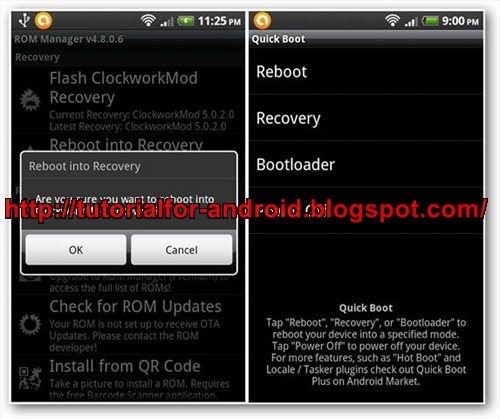
    How to boot into recovery it also depends with your android smartphone, because different what button that you must to be pressed to enter. But if I prefer to use Quick Boot app. It gives me one touch option to Reboot, boot into Recovery or Bootloader and simply Power Off.create nandroid backup via clockwormod recovery
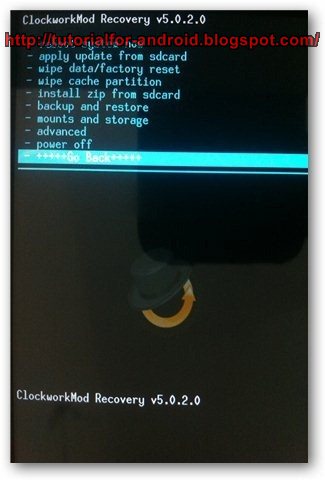
  2. Select ‘Backup and Restore’ from the recovery screen.
    once you have entered to recovery mode, scroll down to the option ‘Backup and Recovery’ and tap it. You can scroll up/down through the menu using the volume buttons and select options using your power button.

    nandroid backup via ClockworkMod Recovery
  3. Start the backup.
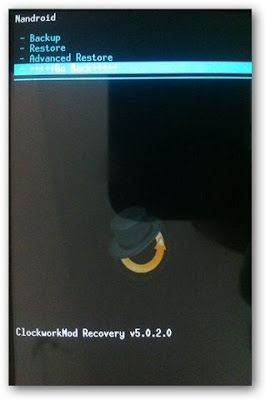
Nandroid Backup Menu

After you are on the Nandroid screen, choose ‘Backup’ option to start the backup process. You have the option to restore backup on the same screen.
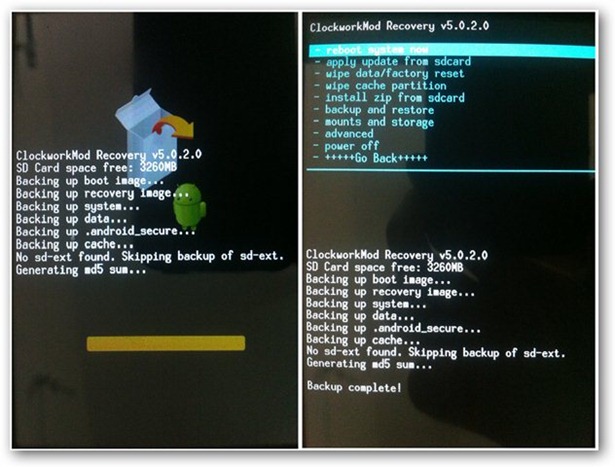
below is the screenshot of the backup process
Nandroid Backup Generating md5 Sum and Finishing Backup Process


Restore from a Nandroid Backup via Recovery


  1. Boot into Recovery and navigate to the Nandroid screen. the step is the same with The first two steps above.
  2. Select ‘Restore’ to start the process.
  3. Reboot system. Your system is now restored and is exactly same as the time when the backup was taken.
Ok. thats it, now you can try to do it. Do a Nandroid backup and then you no need to afraid if you want to do any experiments with you phone. comment please if you want ask a question.

What is Nandroid Backup

All of you must be often heard the term about Nandroid backup on some android tutorial or android article, whether it is related the needed of the process of install, update, root and custom rom. And maybe for some of you still don't know what exactly is nandroid backup. Nandroid backup is closely associated with the process of the install, root and others that I've mentioned above on your android smartphone.

What is Nandroid Backup

Because nandroid back up is a way that is used to backup all the contents of your operating system such as apn and internet setting, various configurations, applications and your games. all the contents of the android operating system that is in your phone will be saved in backup. And will be stored and formed in the image file. so if something wrong happens on your android operating system or you may fail in doing custom rom or other failures you can easily restore it. If you restore you will get back to its previous position as the exact same condition when you make a nandroid backup.

what is nandroid backup

but you must know that nandroid backup does not backup file that is on your SD card. Since this is only backing up the entire contents of your phone. To backup your SD card you can save them to live elsewhere. For example, like the PC / laptop or other storage media. Or if you want to be more practically you can use some application that will give you ease to backup it, the application such as titanium bakup pro. i will share it on another tutorial upgrade android

and now Nandroid has been integrated with Clockwork/Rom manager. So to do nandroid backup you just go to the option to backup your phone and clockworkmod or Rom Manager, and the process will be done in a few minute.

So if you want to do some risk activity with your android smartphone like install custom rom or another update that maybe can brick your phone you can just backup your phone and then if something happen you can restore it with the condition exactly match when you make backup.

Do you have understand about what is nandroid backup? so now you can read makae a nandroid backup
Please comment if you want to ask something.

Samsung Galaxy S3 XXDLH6 Firmware Update

It is the latest news Android 4.1 Firmware Leak for the Samsung Galaxy S3. this amazing smartphone now emerged Android 4.1 version number XXDLH6 further improves the performance and stability of Android 4.1 on the Samsung Galaxy S3. And the man from SamMobile have this XXDLH6 firmware for the Galaxy S3 on their hands.

As before i mentioned about official jelly bean XXDLH4 for galaxy s3. Now Everything goes with this new XXDLH6 Android 4.1 Firmware for the Samsung Galaxy S3 back a little rounder and more stable. , Introduced with Android 4.1 Project butter also provides a smoothest running the firmware. From well-informed sources, is to also learn that Android 4.1 is almost ready for the Samsung Galaxy S3, and that on 29 August will be announced at the IFA 2012 for the Samsung Galaxy S3.

it was also reported that only a few hours after Samsung will announce the Android 4.1 Update for the Samsung Galaxy S3, the update rollout will released too. So then this Samsung flagship will be the first smartphone that will receive Android 4.1 Jelly Bean update.

SAMSUNG GALAXY S3 - ANDROID 4.1 WILL COME IN IFA 2012


But with the announcement of Android 4.1 for the Samsung Galaxy S3 at IFA 2012 was indeed expected for some time, then this will not come as a surprise. We look forward then forward to the final version of Android 4.1 for the Samsung flagship. Thus, the South Koreans have proved that they can still update implemented promptly. I hope that this will also apply for more updates, not only for the Samsung Galaxy S3.

UPDATE : you can see the latest news for galaxy s3 jelly bean update

Micro soft dot net power point presentations and programs

Hi guys here we can find out some basics of  c# and asp.net programs
and power point presentations .


ASP . Net presentations  presentations


Programing in C#  presentations


Dot Net Demo Programs  presentations


dot net demo project  presentations


Xml power point presentations presentations


WML power point presentaions


Official Jelly Bean For Galaxy S3 Leaked With XXDLH4

A sure sign of an impending release of the Android 4.1 update is now within 24 hours 2 . If it increase, one can assume that the update is imminent in the not too distant future. With the already second leak within 24 hours is not to deny that the rollout of Jelly Bean on the Samsung Galaxy S3 is imminent.

During the first firmware leak XXDGL4 yet compiled in July, was the latest version is only days old XXDLH4. According build information they derived from 14 August and is likely to benefit from two weeks more development time significantly. Having noticed the words "release keys" contains is even likely, that this is the firmware, which is distributed in the near future.
samsung galaxy s3 jelly bean

Even though we have not tried out the new editor of the Jelly Bean firmware, we want to play at least what the users of the XDA Developers Forum have been found to innovations.

Jelly Bean Feature in Galaxy s3

  1. Noticeably improved audio recording in video
  2. While recording video you can now also pause
  3. Folder creation is now much simpler and adapted to stock Android. Say: You create a folder by dragging an icon onto another.
  4. "In-call Equalizer" renamed to "My Call"
  5. Wifi timer in the advanced wireless settings
  6. Progress bar instead of loading animation in the file browser when deleting files
  7. Pop-up player can now by pinch-to-zoom gesture to zoom in and out, when you click on the player, the clip is paused.

This is presumably only a small part of the new features. Who wants to know themselves what the firmware, the download takes place along with installation instructions at the XDA-Developers .

Note: The firmware can not be flashed in the original position on a legal way (via Odin or recovery)but requires some initial conditions and editing the install script. you need to make a nandroid backup( what is nandroid backup? ), install CWM, and etc.
Read How to instal jelly bean XXDLH4 on galaxy s3. As always, you are responsible for your own device, for any damage we do not accept any responsibility.

UPDATE : you can see the latest news for galaxy s3 jelly bean update

Have you seen the new Jelly Bean firmware already on your Samsung Galaxy S 3 installed? If so, we gladly accept your feedback - in the comments area.

How To Upgrade Samsung Galaxy Mini to Gingerbread 2.3.7

ok now let me share another tutorial upgrade for galaxy mini. it is been a long time i didn't post any tutorial for galaxy mini. then because one of tutorial for android blog subscriber ask me to post tutorial flash gingerbread 2.3.7 for galaxy mini i will do it now :D
Before we start maybe you want to read my previous tutorial upgrade galaxy mini to gingerbread 2.3.4. To install gingerbread 2.3.7 at least you must at gingerbread version. you can just install it directly. 2.3.7 is the latest version of gingerbread for galaxy mini and sure if it is more stable and fast compared then the another prevoius version. Now before we start the tutorial installation guide you must prepare the requirements.


upgrade galaxy mini to android 2.3.7


Requirements


After you have download all the file above then lets go ahead to the instruction

Flash Clockworkod Recovery

skip this section if you've installed the CW

  1. Download: TASS-recovery-cwm.tar
  2. Run S5570_Odin Multi Downloader v4.38.exe
  3. Select Options TASS.Ops in OPS
  4. Check the One Package
  5. Select-recovery-Tass cwm.tar the One Package
  6. Click Start and wait until the Finish
  7. then wipe data / factory reset


How To Upgrade Gingerbread 2.3.7 for Galaxy Mini
  1. Download and copy ROM CM7 RC 5.2 to your  SD Card. remember place it on the outside
  2. Reboot and go into Recovery Mode
  3. Select install zip from sd card - choose zip from sd card find  ROM CM7 RC 5.2 that has been placed on the SDCard - Select Yes - Install update
  4. Wait for it to finish and reboot
  5. Wipe the HP and reboot
  6. done


Now you have successfully upgrade galaxy mini to gingerbread 2.3.7 . please comment if you need some further assistant. see you in next tutorial for android post

Download Shazam For Android Phone

Almost everyone knows it. We want to hear music on the radio it is extremely well, but the damn radio announcer come out with the title or not it is directly next to the track. Luckily we live in the 21st Century and there are smartphone apps solve this problem.

What is Shazam

Shazam is music apps for android. The app recognizes music, preferably known hits. To a section of the current song is recorded and compared with an online database. If they match the appropriate title is displayed.

The app is well designed, right from the start seems a giant Shazam button for the core function of the program: identify music tracks! The hot shots in Shazam day. The menu bar at the top of the screen you can access all day, pull up a list of 10 songs (Chart) or tags on Facebook (friends). The menu key takes you to now tagging, blogs and settings.
download shazam android

Shazam for android in the test correctly identified the Top 10 on the charts right away. But depending on the match of music and awareness of the need app. Sun may Shazam classical music at all and does not even hard to jazz. This is probably because the songs that have very different places, or simply does not exist in the database. In electronic music, hip hop, and dancehall Shazam has a good rate, reggae, rock and metal is the app is not as good. Especially well-known tracks are no problem for Shazam, but you would not know the name so often ...


Tips

First Microphone close to speakers hold
Second During the chorus take up
Third If no result simply try again.

Conclusion

Shazam is well known to music on the radio or seen in the disco. For people with a decent taste in music app could be a disappointment.

Download Shazam from google play. and if you want to save it to an apk file read how to download apk from google play .

Google Channel Store In Germany Now Launch Movie Rental

Once Google has been extended in July to play a book offering, Google has now expanded the offer refills and in Germany by a film distribution company. In that film distribution now android users can borrow from their android device and play full length movies to watch them on it. Google play offers in Germany now such as apps, games, books and movies.


This program includes many big movies studios (eg Atlas film, Disney, Paramount Pictures, Senator Film, Universum Film & Sony Pictures Entertainment) in full length.

Releases can from € 3.99 to € 4.99 at normal quality and HD are available for hire. In the film archive there are movies already from 2,99 €. The rented movies can be watched within 30 days. Important: If a movie starts, you have only 48 hours watching it over.

The movies can be viewed immediately after purchase online (streamed). On smartphones and tablets you must download Google App play movies first. Alternatively, the films can also be downloaded by the way. Then they can be viewed without an internet connection.

For the Google Android App Store Play -> Dowload Google Play Movies & TV

Android 4.1 update Galaxy S3 for the Jelly Bean IFA 2012?

There currently is a rumor that the Samsung Android Galaxy S3 Jelly Bean 1.4 update almost ready, and probably already at the IFA in 2012 to be released. That the Android 4.1 update from Samsung could be ready in late August, there were also long been rumors. However one, could not believe that Samsung is really fast.

But now there is growing speculation that the IFA 2012 appearing on the Galaxy note 2 and the Galaxy S 3 where the official Android 4.1 update from Samsung will get missed. Actually, Samsung just rather incredible that they should have really made ​​it in such a short time, but rather updates took a little longer there.

The Samsung Galaxy Note 2 release party probably really big event and publish the same, the Android 4.1 for the update Galaxy S3. So the South Koreans were the first ones to this update, the next offer Google phones. Whether it will really be already at the IFA 2012 so far, all just rumors.

GALAXY S3 GETS ANDROID 4.1 FOR IFA 2012 ?


However, it would be enormously important for Samsung, the Android 4.1 update for the Samsung Galaxy S3 as soon as possible to offer. Latest rumor is the largest competitor, the new Apple iPhone 5, starting at 12th September preorder. Until then upgrade to the Galaxy S3 on Android 4.1, Which would certainly Provide an incentive for many buyers.
UPDATE : you can see the latest news for galaxy s3 jelly bean update

New Samsung Galaxy S3 Black Color

New Galaxy S3 will have the right to launch! Now on the first press it says The Galaxy S3 appeared black color, they come from T-Mobile USA. And must I say, you look very nice S3 Galaxy. Black and Noble, Must have!

Right before the IFA some new news about Samsung Galaxy S3 come around the corner. Just like now, finally, the first official photo of the Black Galaxy S3. So it probably will be presented at the IFA 2012, it also looks like it until now, perhaps with the Android 4.1 update Jelly Bean.

I can well imagine that now some users who had opted for the white Galaxy S3, perhaps a little regret their decision. Because this phone in black for me still sees a corner valent, and the color also looks more ellegant. Therefore I expect a sales success for this color variation.

SAMSUNG S3 HITAM GALAXY - BLACK BEAUTY

samsung galaxy ace 3 new black color display

Of course you must have the S3 Galaxy in black and only once "personally" held in their hands, but the press photo of course makes you want more. Which one do you like? the white version or this black version? decide it! :D

Samsung Galaxy Note 2 leaked ?

GSMArena has a picture and some information on the coming soon of Samsung Galaxy Note 2 N7100. The image can be see at any rate of the previous mockups of an oversized Galaxy S3 similar, rounded corners, the frame thinner. But Unlike the Samsung Galaxy S3, the camera and the sensors are not here side by side but the right and left of the speakers spread across the front.

Yesterday i also have discussed about the Galaxy Note 2 new display. The anonymous source says that its specification is with a 1.5 GHz quad-core Exynos and a display with a 1280 × 800 pixel resolution. the processor at 100 MHz would then be only slightly faster than of the Galaxy S3. With the 5.5 "display would have the same resolution as the Samsung Galaxy note. A Full HD display was indeed tested, but here the power consumption was so high. However, this time without the display comes Pentile and instead with a "normal" RGB matrix, therefore, it would be a sAMOLEDplus screen The camera is -. According to the anonymous source - be the same as S3 in the Galaxy, 8 Megapixels have.

samsung galaxy note 2 leaked

Information for owners of Samsung Galaxy S3 will have the information: Jelly Bean is almost finished and will be unpacked in the events on 29 August


What to make of the image and the information is hard to say, the picture is more or less known mockups and the information also. At least I do not like the picture, because there were better mockups and so I would tap a fake. That Android 4.1 for the Galaxy note 2 is not yet finished and the device is perhaps presented with Android 4.0 corresponds to a rumor of SamMobile, so you could have someone here again based only on rumors. Let us wait, about the Galaxy note 2, of course stay update with android latest news update blog to get the update.

HorizontalScrollView And ScrollView

java.lang.Object
   ↳android.view.View
    ↳android.view.ViewGroup
     ↳android.widget.FrameLayout
      ↳android.widget.HorizontalScrollView

Class Overview


Layout container for a view hierarchy that can be scrolled by the user, allowing it to be larger than the physical display. A HorizontalScrollView is a FrameLayout, meaning you should place one child in it containing the entire contents to scroll; this child may itself be a layout manager with a complex hierarchy of objects. A child that is often used is a LinearLayout in a horizontal orientation, presenting a horizontal array of top-level items that the user can scroll through.
The TextView class also takes care of its own scrolling, so does not require a HorizontalScrollView, but using the two together is possible to achieve the effect of a text view within a larger container.
HorizontalScrollView only supports horizontal scrolling. For vertical scrolling, use either ScrollView orListView.

ScrollView and HorizontalScrollView are layout container for a view hierarchy that can be scrolled vertically or horizontally by the user, allowing it to be larger than the physical display. A ScrollView/HorizontalScrollView is a FrameLayout, meaning you should place one child in it containing the entire contents to scroll; this child may itself be a layout manager with a complex hierarchy of objects.

XML code :
------------
<?xml version="1.0" encoding="utf-8"?>
<LinearLayout xmlns:android="http://schemas.android.com/apk/res/android"
  android:orientation="vertical"
  android:layout_width="fill_parent"
  android:layout_height="fill_parent"
  >
<TextView
  android:layout_width="fill_parent"
  android:layout_height="wrap_content"
  android:text="HorizontalScrollView And ScrollView  "
  />
<HorizontalScrollView
  android:layout_width="wrap_content"
  android:layout_height="wrap_content">
<LinearLayout
  android:orientation="vertical"
  android:layout_width="wrap_content"
  android:layout_height="wrap_content">
<TextView
  android:layout_width="fill_parent"
  android:layout_height="wrap_content"
  android:text="First HorizontalScrollView" />
<LinearLayout
  android:orientation="horizontal"
  android:layout_width="wrap_content"
  android:layout_height="wrap_content">
<Button
  android:text="Horizontal A1"
  android:layout_width="wrap_content"
  android:layout_height="wrap_content"/>
<Button
  android:text="Horizontal A2"
  android:layout_width="wrap_content"
  android:layout_height="wrap_content"/>
<Button
  android:text="Horizontal A3"
  android:layout_width="wrap_content"
  android:layout_height="wrap_content"/>
<Button
  android:text="Horizontal A4"
  android:layout_width="wrap_content"
  android:layout_height="wrap_content"/>
<Button
  android:text="Horizontal A5"
  android:layout_width="wrap_content"
  android:layout_height="wrap_content"/>
</LinearLayout>
</LinearLayout>
</HorizontalScrollView>
<HorizontalScrollView
  android:layout_width="wrap_content"
  android:layout_height="wrap_content">
<LinearLayout
  android:orientation="vertical"
  android:layout_width="wrap_content"
  android:layout_height="wrap_content">
<TextView
  android:layout_width="fill_parent"
  android:layout_height="wrap_content"
  android:text="Second  HorizontalScrollView" />
<LinearLayout
  android:orientation="horizontal"
  android:layout_width="wrap_content"
  android:layout_height="wrap_content">
<Button
  android:text="Horizontal B1"
  android:layout_width="wrap_content"
  android:layout_height="wrap_content"/>
<Button
  android:text="Horizontal B2"
  android:layout_width="wrap_content"
  android:layout_height="wrap_content"/>
<Button
  android:text="Horizontal B3"
  android:layout_width="wrap_content"
  android:layout_height="wrap_content"/>
<Button
  android:text="Horizontal B4"
  android:layout_width="wrap_content"
  android:layout_height="wrap_content"/>
<Button
  android:text="Horizontal B5"
  android:layout_width="wrap_content"
  android:layout_height="wrap_content"/>
<Button
  android:text="Horizontal B6"
  android:layout_width="wrap_content"
  android:layout_height="wrap_content"/>
</LinearLayout>
</LinearLayout>
</HorizontalScrollView>
<ScrollView
android:layout_height="fill_parent"
android:layout_width="fill_parent">
<LinearLayout
  android:orientation="vertical"
  android:layout_width="fill_parent"
  android:layout_height="fill_parent" >
<TextView
  android:layout_width="fill_parent"
  android:layout_height="wrap_content"
  android:text="Vertical ScrollView" />
<Button
  android:layout_width="fill_parent"
  android:layout_height="wrap_content"
  android:text="Button C"/>
<Button
  android:layout_width="fill_parent"
  android:layout_height="wrap_content"
  android:text="Vertical ScrollView D"/>
<Button
  android:layout_width="fill_parent"
  android:layout_height="wrap_content"
  android:text="Vertical ScrollView E"/>
<Button
  android:layout_width="fill_parent"
  android:layout_height="wrap_content"
  android:text="Vertical ScrollView F"/>
<Button
  android:layout_width="fill_parent"
  android:layout_height="wrap_content"
  android:text="Vertical ScrollView G"/>
<Button
  android:layout_width="fill_parent"
  android:layout_height="wrap_content"
  android:text="Vertical ScrollView H"/>
<Button
  android:layout_width="fill_parent"
  android:layout_height="wrap_content"
  android:text="Vertical ScrollView I"/>
</LinearLayout>
</ScrollView>
</LinearLayout>

For Full Source Clik Here : ScrollView


Android 4.1 Jelly Bean shut down temporarily App Copy Protection

With the release of Android 4.1 Google introduced a copy for paid apps in the Google Channel Store. But now, Google had this new feature of Android 4.1 will be turned off. The reason is simply that many of these paid apps on the basis of this protective mechanism could no longer run.

Because in the Android scene many pirated copies are traveling and it also complaints from app developers, rightly admitted under Google Android 4.1 Jelly Bean had introduced the Encryption app. This copy provides a unique key that is from the user's account and the Android device generates, that paid apps can not be extracted from an Android device and installed on another.

But unfortunately there are probably some problems with the app Encryption. There were problems with apps that access to system services from Android or even with some live wallpapers. They refused plötzlic to be started.

ANDROID 4.1 APP ENCRYPTION OFF FOR NOW


Now Google has shut down once the new App Encryption in the latest version 7.3.15 Google Channel Store. If Google has found a solution to the problem, then the copy protection mechanism via the update is currently only solution aktiviert.Als again helps to clear the affected apps again and reinstall, so that Android apps work again without problems.

Motorola RAZR launched Android 4.0 update

Should it really be ready? From The Last report it is now available Android 4.0 update for the Motorola RAZR. The Android 4.0 update was announced at the weekend by Motorola on Facebook and is now available via OTA to your Motorola RAZR. Apparently it is also the same for Android 4.0, the Motorola RAZR MAXX available.


the users of the Motorola RAZR MAXX and RAZR models have been waiting for a long tome for this day. From now on Android 4.0 will be rolled out for these two models. Announced the update was already several months ago, but nothing happened so far. And many users of the Motorola models were visibly frustrated to angry.

Personally, I lie now, but still not confirmed news about the release date of the Motorola RAZR Android 4.0 rollout. But we can assume that after the official announcement on Facebook, the update is started. Of any changes so far nothing is known, however, is to assume that will keep the Android 4.0 update to the recently leaked firmware update for the Motorola RAZR.


MOTOROLA RAZR GETS ANDROID 4.0


motorolla razr android 4.0 update release date

Of course it is possible that by the simultaneous global launch Android 4.0 update for the Motorola MAXX is not the same on every smartphone available. Like other manufacturers, it will happen in some stage, that is, by and by then, the models are supplied.

Android companies List In Vishakapatnam


Link Name 
--------------------------------------------------------------
http://www.bluefrogindia.com blue frog

http://www.e-centricsolutions.com/   ecentric solutions 

http://faqden.com/          faqden Labs 

http://www.gaiansolutions.com/         gain softsoluations

http://www.jitworld.com          jit world 

http://www.stellentsoft.com/         stellen and soft

http://www.xinthe.com        Xinthe technologies 

http://www.vizser.com        vizser limited


Real time Android training  in Vishakapatnam

http://techtrainin.blogspot.in/p/android-programing.html